Content & SEO
Site Architecture
Definition
A solid site architecture is the foundation of a Smart Site. Without clear structure, even the best copy and SEO will not convert.
Rules and Guidelines
- Each page should have one clear purpose (service, topic, or intent).
- Avoid duplicating content; use hierarchies and internal links instead.
- Separate topics when search intent is different; combine them when phrases are synonymous.
- Use predictable, consistent structures (Homepage → Category Landing Pages → Core Pages).
- Label pages in clear, human language so visitors (and Google) instantly understand them.
Key Takeaway
Strong architecture ensures users find what they need, Google understands the site, and conversion pathways remain simple and effective.
Cross-References
Pages & Navigation > Page Types and Navigation Tiers (navigation structure)
Motivating Factors & 3-30-3 Rule
Definition
Motivating Factors are the core reasons visitors choose to stay on a site and take action. They answer a user’s immediate questions and reassure them they are in the right place — within the first three seconds of arriving.
By design, Hibu includes motivating factors in the
hero sections of the homepage, category landing pages (CATs), and core service pages. On homepages and CATs, we also include a
“Why Choose Us” section featuring six motivating factors for added visibility.
Hibu refers to these as
S.Q.O.T. Factors:
- Speed – “How fast can you fix my problem?”
- Examples
- 24/7 Emergency Services
- Express Check-In and Check-Out
- Walk-Ins Welcome
- Quality – “Do you stand by your work? Why should I hire you?”
- Examples
- State-of-the-Art Facilities
- More Than $50 Million Won for Our Clients
- Offer – “How much will it cost? What savings or guarantees are available?”
- Trust (Reviews/Testimonials) – “Why should I trust you?”
Why They Matter
- Motivating factors, paired with a strong headline and hero design, are what get users past the first 3 seconds. If we can’t confirm to a visitor that they’ve landed on the right page, they’ll leave — and conversions are lost.
- They directly support the 3-30-3 Rule:
- 3 seconds: Headline + motivating factors confirm relevance.
- 30 seconds: Benefits, trust signals, and Why Choose Us sections prove value.
- 3 minutes: Clear CTAs and persuasive copy drive conversion.
- Effective motivating factors drive conversions, reduce cancellations due to “poor ROI,” and make it harder for competitors to steal away traffic.
Rules and Guidelines
- Motivating factors must be relevant, specific, and honest — based on the client’s industry and customer needs.
- Avoid weak or throwaway motivators (e.g., “Service with a smile”). Focus on what truly drives action: speed, quality, offers, and trust.
- Writers and QA must review motivators carefully and edit if they don’t make sense for the business or audience.
- Motivators should be prominent and mobile-friendly — easy to see at a glance.
- Repetition is encouraged when appropriate: global offers or guarantees may appear across multiple pages, since any page can serve as a landing page.
- Client requests for different motivating factors on different pages:
- This is acceptable only after first proof.
- Motivating factors must be connected to a business text field. No manual-only motivators are allowed.
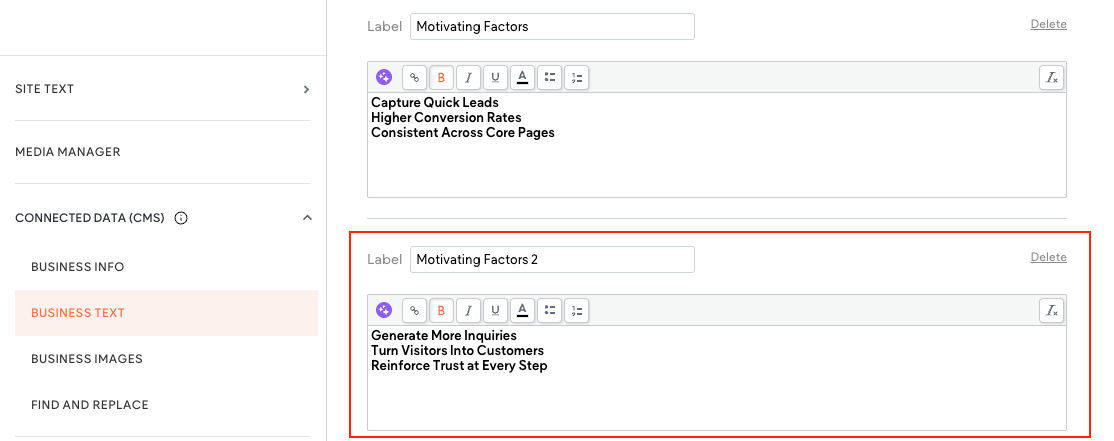
- A Hibu team member must create a new field in Business Text (e.g., Motivating Factors 2, Motivating Factors 3, Motivating Factors 4).
- Motivating factors must be connected to a business text field. No manual-only motivators are allowed.
Cross-References
Design Elements > Buttons (CTA placement and conversion)

Introduction
When it comes to content and SEO, our goal is simple:
- Build sites that rank by being technically sound and search-friendly.
- Build sites that convert by speaking directly to the audience with clear, motivating content.
- Build sites that are sustainable — consistent, trustworthy, and aligned with modern search and user experience standards.
But above all:
if visitors don’t stay on the site, nothing else matters. That’s why every Hibu One Smart Site follows the
3-30-3 Rule:
- 3 seconds to confirm the visitor has arrived in the right place — through the combination of headline, motivating factors, and hero design. The immediate goal is to keep them on the page.
- 30 seconds to prove value — with benefits, trust signals, and supporting offers that reassure them this business can meet their needs.
- 3 minutes to drive conversion — guiding them with clear CTAs, scannable content, and persuasive supporting copy.
If a visitor isn’t convinced in the first 3 seconds, the money spent to drive them to the site is wasted. Our responsibility is to make sure they stay, engage, and convert.
Hibu One Smart Sites are
AI-optimized for SEO and built to convert. Our approach is not simply to “add keywords,” but to create
technically sound, trustworthy, human-centered websites that rank well because they are designed for both people and search engines — and ultimately drive visitors to act.
Copy, Tone, and Audience Fit
Definition
- AI generates the initial copy for Hibu One Smart Sites. Copywriters and QA refine that content to ensure it is accurate, clear, brand-appropriate, and designed to convert. Copy plays a critical role in the 3-30-3 Rule: while motivating factors and the headline hold visitors past the first 3 seconds, it’s the copy and tone that keep them engaged for the next 30 seconds — long enough to prove value and encourage deeper exploration.
Overall Expectations
- Copy must be professional, approachable, and conversion-focused.
- Tone should match the business type (serious, professional, casual, etc.) and remain consistent across the site.
- Copy should emphasize benefits over features and always guide visitors toward a CTA.
- Clear, scannable formatting (headings, bullets, short paragraphs) ensures visitors can quickly find what matters.
- Copy must reinforce motivating factors and extend them with supporting detail, proof points, or offers.
What to Look for When Editing AI Copy
Copywriters and QAEs should refine AI content as usual, with a focus on carrying users from attention (3 seconds) → value (30 seconds):
- Fix formatting issues (spaces, breaks, headings).
- Verify CTAs are present, varied, and linked correctly. Limit to one CTA per paragraph.
- Remove clichés, fluff, hallucinations, or repetition.
- Confirm tone consistency and proper use of the Name of Business (NOB).
- Ensure copy connects back to Speed, Quality, Offer, and Trust factors where appropriate.
- Check spelling, grammar, and American English consistency.
Adding Additional Content
- Insert new content within the main text block before the Contact Us section on internal pages.
- Maintain heading hierarchy (H2/H3).
- Align new copy with the site’s chosen tone and ensure it includes a CTA.
Copywriter & QAE Responsibilities
- Copywriters: Refine AI text, add CTAs, ensure accuracy, and expand motivators into persuasive supporting copy.
- QAEs: Verify edits, confirm consistency, and ensure the site is
conversion-ready by supporting the 3-30-3 flow (attention, value, conversion).
Title and Meta Description Tags
Definition
Title tags and meta descriptions are snippets of code that define how a page appears in search results and social shares. Together they act like a
mini ad for the page — the title grabs attention, and the meta description persuades the click.
From a conversion-first perspective, titles and metas are the
pre-click version of the 3-30-3 Rule. In the search results, they are often the first and only chance to convince someone to visit the site. If they don’t click, they never reach the page — and the 3-second, 30-second, and 3-minute stages of conversion never happen.
Sometimes the most important conversion is simply getting a user to click through from search results. One effective way to encourage that action is by including a motivating factor or offer in the meta description (e.g., “Free Estimates Available” or “Call Today for Same-Day Service”).
Why They Matter
- Drive the first conversion: Titles and metas are often the first touchpoint with the brand and must persuade users to click.
- Improve visibility by signaling relevance to search engines.
- Influence click-through rates (CTR) in both search results and social shares.
- Establish consistency of messaging across the site.
- Offers or motivating factors in meta descriptions can directly increase clicks and conversions.
Rules and Guidelines
- Every visible page must have a unique title tag (≤ 60 characters) and a unique meta description (≤ 160 characters).
- Hidden and password-protected pages require only a title tag.
- Titles and metas must be descriptive, accurate, and aligned with page intent.
- Home, Contact, and Utility Pages should include the Name of Business (NOB).
- Service/Product Pages may omit NOB when user intent is generic (e.g., “roof repair near me”).
- Meta descriptions must be in sentence case; avoid excessive capitalization.
- Titles and metas must work together like a mini ad: headline + supporting copy.
- In Duda: Page Meta Title = title tag; Page Meta Description = meta description.
- Conversion-first requirement: phrasing must motivate the click, using benefits, offers, or urgency where appropriate.
Expectations for Review
- Confirm uniqueness across the site (no duplicate titles/metas).
- Verify alignment with on-page content and the correct service/location.
- Ensure tone is persuasive and audience-appropriate.
- Watch for AI pitfalls: awkward phrasing, keyword stuffing, colon-heavy headlines.
- Ask: “Would I click this?” Titles and metas should read like a
mini ad, designed to convert searchers into site visitors.
Page URLs (Slugs)
Definition
A page URL (also called a “slug”) is the part of the web address that comes after the domain name (e.g.,
domain.com/page-url
). Just like a filename, the slug tells both search engines and people what the page is about. Clear, simple, and descriptive slugs improve search visibility and give users confidence that they’ve landed on the right page.
Rules and Guidelines
- Use the navigation label as the basis for the page name.
- Use
hyphens to separate words (
/roofing-services). - Use lowercase characters only.
- Do not use special characters (
# & % + * = @ ~ ^ $), except for hyphens or slashes. - Keep slugs concise, literal, and user-friendly.
- Service Area Page URL Structure
- .com/contact/keyword-service-area/city-st
- .com/contact/residential-painting-service-area/king-of-prussia-pa
- GEO Page URL Structure
- .com/contact/keyword-city-st
- .com/contact/residential-painting-king-of-prussia-pa
Examples
- Roofing Services →
/roofing-services - FAQs →
/faqs - Contact →
/contact - About →
/about - Reviews →
/reviews - Gallery →
/gallery - New Patient Forms →
/new-patient-forms
Expectations for Review
- Verify all page URLs follow slug guidelines.
- Check for clarity and consistency across the site.
- Ensure slugs match searcher expectations (no vague or “clever” names).
- Confirm URLs align with navigation labels and site hierarchy.
- For Service Area and GEO pages, confirm the correct keyword + geo structure is used.
- Ask: “If I saw this URL in search results, would I know what the page is about — and feel confident clicking it?”
Schema
Definition
A Hibu One Smart Site is designed to be clear and easy for search engines to understand. Structured data (schema) provides behind-the-scenes context that makes site content easier to interpret, more visible in search results, and more useful to potential customers.
Schema Types Included by Default
Each Smart Site includes multiple schema types to define what different parts of the site mean:
- Website Schema – Identifies the site as the client’s main online presence.
- Local Business Schema – Highlights business name, address, phone, hours, and service areas for accuracy in local and map results.
- FAQ Schema – Surfaces common customer Q&As directly in search results, driving visibility and clicks.
- Breadcrumb Schema – Shows page relationships, making navigation clearer for both search engines and users.
- Blog Schema* – Enables articles to appear in “Discover” feeds or as featured posts when users search related topics.
- Video Object Schema* – Helps videos surface with thumbnails and key details in search.
- Reviews Schema* – Highlights customer reviews and ratings, helping businesses stand out with trust signals directly in search results.
*These schema types are applied only when the related content is displayed on the site.
Rules and Guidelines
- Schema is automatically included with no option for direct client-side customization.
- If a client requests additional schema (e.g., Service, Product, Person, or Organization), they must generate it externally and provide the code.
- Hibu can insert client-supplied schema into the header HTML section of a specific page using the single-page SEO options.
- All schema must be
accurate, relevant, and tied to visible on-page content.
AI and llms.txt
Definition
All major AI platforms — ChatGPT, Perplexity, Gemini, Google AI Overviews, Copilot, and others — build their results from the same public internet that powers traditional search. These systems crawl, index, and interpret site content, then decide whether to reference it when users ask a question or perform a search.
Hibu One Smart Sites are built to maximize the chances of being indexed, understood, and referenced in these AI search experiences.
How Hibu One Sites Are AI-Friendly
- Content Depth – Detailed, robust copy gives AI models meaningful, context-rich information about the business.
- Local Ranking Boost – Adds optimization (on-site and off-site), improving the likelihood of being referenced in local AI queries.
- Geo & Service Area Pages – Expand coverage, making it easier for AI and search engines to match the business with location-based or service-specific searches.
- Structured Clarity – Coding (similar to schema) helps AI systems interpret content accurately, including the llms.txt file.
- llms.txt File – A machine-readable file giving large language models direct context about the business, its services, and how site content can be referenced.
How to View llms.txt
You can view the llms.txt file for any live site by adding
/llms.txt
to the end of the domain (e.g.,
www.example.com/llms.txt
).
When reviewing the file, look for:
- Business context (signals like “local service provider” or “medical practice”).
- Content definitions (services, pages, FAQs).
- Usage guidance (instructions to AI systems on how content may be interpreted or referenced).
Why It Matters
- AI Visibility - Schema + llms.txt help AI systems understand not just what’s on the site, but what it means.
- Local Relevance - Expanded service and geo content increases opportunities for matches in AI search.
- No Guarantees - Just as with Google organic results, no platform guarantees inclusion or ranking in AI answers. Proprietary algorithms ultimately decide what to show. Our role is to give every client the best possible opportunity to appear where it’s relevant and valuable.
Rules and Guidelines
- llms.txt is included automatically with every Hibu One Smart Site.
- The file is not customizable; its content is generated and maintained automatically by the platform.
- Local Ranking enhances AI optimization by expanding service area and geo coverage, which increases the likelihood of being referenced by AI platforms.
- Clients may
view the llms.txt file at any time by appending
/llms.txtto their domain. - The llms.txt file updates automatically whenever a page is added, deleted, and the site is republished.
- Hidden pages are included, but any page set to “no index” will not appear.
PDFs & Downloadable Files
Definition
On a Hibu One SmartSite, client-supplied files can be added as downloadable attachments. Each file will display with a clearly labeled button element (e.g., “Download [File Name]”) so users can easily access the content.
PDFs are the
preferred format because they are universally accessible, consistent across devices, and searchable by Google. Other file formats may be accepted, but whenever possible they will be converted into PDF before publishing.
Fair Use Rules
Per the Fair Use Content Policy:
- A site may include up to 50 PDFs (or other downloadable files) total.
- Files may be placed on individual service pages or grouped on a dedicated downloads page.
- Multiple files may be added to a single page, but the site total may not exceed 50.
- Clients may upload additional files themselves using the DIY editor, without limit.
File Formats & Conversion
- Preferred format: PDF
- Other accepted formats (converted to PDF when possible): doc, docx, xls, xlsx, ppt, pptx, psd, zip, xml, mp3
- Conversion rules:
- Hibu will convert Word, Excel, PowerPoint, images, and other supported files into PDF prior to upload.
- Hibu will not edit client-supplied files before conversion.
- Hibu will not create new PDFs on behalf of clients.
SEO & File Naming Standards
Because PDFs are indexable by search engines, their content and embedded links may appear in results. With consistent, keyword-friendly naming, PDFs can rank for relevant queries.
Hibu will rename all PDFs and other downloadable files using the following convention:
- Use the file’s subject, not the web page title (e.g., form, faq, menu, brochure, price list).
- All characters in lowercase.
- Replace spaces with dashes (–), never underscores.
Examples:
- mikes-automotive-services-form.pdf
- ferrantes-italian-bistro-dinner-menu.pdf
- juniors-flooring-and-tile-hardwood-floor-faq.pdf
- madison-hardware-rental-agreement.pdf
- dr-lou-reed-new-patient-intake-form.pdf
Non-PDF files (e.g., zip, mp3) that cannot be converted should still follow the same naming convention.
Internal Notes
- Always rename files upon receipt to match naming convention.
- Correct typos in file names before upload (e.g., hardward → hardware).
- Track file totals against the 50-file site maximum.
- Log assumptions if:
- Files exceed the Fair Use Policy limit.
- A file cannot be converted.
- A client requests edits to file content (out of scope).