
Service Area Pages (SAPs)
Service Area Pages (SAPs)
Effective Date: February 1, 2026
Last Updated: February 7, 2026
Hibu Policy
Service Area Pages (SAPs) are designed primarily for businesses that
travel to their customers. SAPs may also be used for brick-and-mortar businesses that customers visit
only when the business has Local Ranking + Hibu One
and has not purchased Geo Pages. SAPs follow a dynamic page-generation model, must meet strict eligibility criteria, and must use standardized URL structure, metadata rules, and editorial guidelines.
Note: SAPs support up to
150 cities per keyword and a
60-mile radius—which is typically broader than what is appropriate for brick-and-mortar businesses. When a business requires local visibility but has only one or a few locations,
Geo Pages are preferred, and Geo Pages do not require Local Ranking.
Related:
Geo Pages and
SAPs vs. Geos Comparison Table
Definition
A Service Area Page (SAP) is a dynamically generated, location-specific page created for businesses that travel directly to the customer’s location. SAPs are built from a
Parent Service Area Page (PSAP) and then dynamically populated using Collections to create individualized pages for each target City, ST. SAPs may also be used for brick-and-mortar businesses that customers visit only when the business has Local Ranking + Hibu One and has not purchased Geo Pages.These pages are structured to appear in local search results for service-and-city combinations (e.g., “AC repair in Berwyn”).
Purpose / Why It Matters
SAPs help service-area businesses expand their reach beyond their primary city of operation. SAPs support:
- Broader local search coverage across multiple Cities
- Increased visibility in service-and-city search queries
- Scalable deployment of high-volume, dynamically generated pages
- Centralized, controlled updates through PSAP edits
- Accurate geographic targeting using dynamic text insertion
SAPs give traveling businesses consistent visibility across dozens—even hundreds—of Cities within their service radius.
Rules & Guidelines
Eligibility & Requirements
- Must have Hibu One + Local Ranking
- Must be a business that travels to customers
- SAPs may be added to brick-and-mortar businesses only if:
- The business has Local Ranking
- The business has not purchased Geo Pages
- SAPs support up to 150 cities per keyword
- Default radius: 60-mile radius
SAPs and Geo Pages cannot be used together.
How SAPs Are Generated
Parent Service Area Page (PSAP)
All Service Area Pages (SAPs) originate from a single Parent Service Area Page (PSAP).
Each
primary keyword or service category is assigned its own PSAP.
For example, “Kitchen Remodeling” and “Bathroom Remodeling” are created as
separate PSAPs, even when they exist on the same site and serve the same geographic areas.
Writers generate the core PSAP content via the Copy Writing Tool, including:
- Page copy
- Title tags
- Meta descriptions
Dynamic Generation
For each city selected under a PSAP:
- Generic area names are included as “City, ST.”
- The Copy Writing Tool connects each City, ST to the appropriate PSAP collection
- All SAPs inherit updates made to their associated PSAP
SAPs are not individually edited. Each PSAP controls all content for its related SAPs.
Content Requirements
SAPs are for businesses that travel to the customer. Language must reflect service coverage—not physical presence.
Use:
- “Proudly serving Berwyn, PA, and surrounding towns.”
- “We come to you—serving homeowners across Berwyn and nearby communities.”
- If SAPs are added to a brick and mortar
- Include a unique geographic reference in body copy
- Clearly state where the business is actually located
- Clarify that the business serves the City, ST (not that it is located there)
- “While our office is located in New Rockbridge, we proudly serve clients in Concord.”
- “With locations in Cranston, Warwick, and East Greenwich, we’ve been serving the Kent County area for over 25 years.”
Avoid
- “Located in [Geo Town]” if untrue
- Any language that suggests a nonexistent physical office
- Breadcrumbs do not display on SAPs.
- Related Services links do not display on SAPs
Editing & Support
- Clients may add or remove towns at any time through Support.
- Content changes are made to the PSAP, not individual SAPs.
- CWs must ensure all dynamic content is connected and functioning correctly.
Navigation & Linking
Service Area Pages are accessed through their own dedicated SAP Directory Page, hence forth, Directory Page, which lists and hyperlinks all the services area pages alphabetically by City, ST. The Directory Page has its own unique title tag, meta description, and page URL. By default, the Directory Page uses the template-defined slug:
-
/serving-area
This
Directory Page is linked directly from the
Contact Us / Locations
page.
- SAPs do not appear in the Tier 1 (global) navigation.
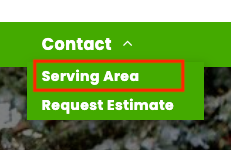
- SAPs are accessible from the Contact Us / Locations Page through a sub-nav labeled “Serving Area”
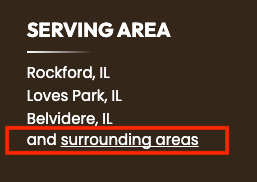
- In the site footer, the phrase “and surrounding areas” is displayed:
- When SAPs are active,
“and surrounding areas” is hyperlinked to the serving area page
(
/serving-area). - When no SAPs are included, the phrase still appears but is not hyperlinked.
SAP Directory Page Title Tag
- Serving Area | NOB
SAP Directory Page Meta Description
The Directory Page uses a single meta description written in the standard homepage meta-description pattern. QAE must select between one and three keyword phrases based on what appears on the Directory Page.
Keyword selection rules:
- If only one keyword phrase exists, include one.
- If two keyword phrases exist, include two.
- If more than three keyword phrases exist, the QAE must select up to three unique, non-overlapping terms.
- Do not include keyword variants that express the same concept (e.g., roofing contractor, roofing company, roofer).
- Selected terms must read naturally and accurately represent the primary services featured on the Directory Page.
Meta Description Format:
Primary CTA [NOB] for your [keyword phrase], [keyword phrase], [keyword phrase].
SAP Hero Form Requirements
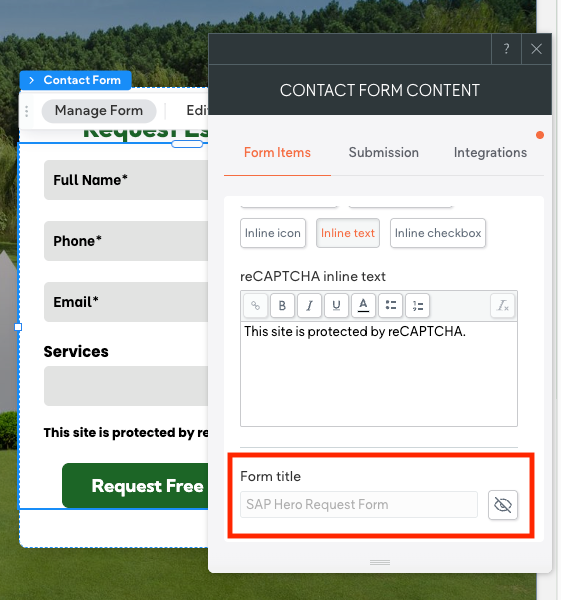
If a Service Area Page includes a hero-placed form, the form title must identify that the lead originated from an SAP. Update the standard “Hero Request Form” to:
“SAP Hero Request Form”
To apply correctly:
- Unhide the form
- Update the title to include SAP
- Re-hide the form
- The grayed-out form title confirms it is hidden and properly updated
The
CW is responsible for updating this form title when preparing or editing the PSAP.
This ensures:
- SAP leads are identifiable in the client dashboard
- SAP submissions are distinguished from other form fills
- Accurate attribution for Local Ranking performance
SAP Page URL Structure
All Service Area Pages must use the standardized SAP slug format. The URL always begins with /contact/ and follows this structure:
-
contact/[sap-keyword-term]/[city-st] (/city-st is dynamically inserted into slug)
Approved examples:
-
/contact/fence-repair-services-service-area -
/contact/roof-repair-service-area -
/contact/ac-repair-service-area
Notes:
- “Services-service-area” is acceptable where required by the keyword structure
- Keywords should use slug format (lowercase, hyphenated)
Title and Meta Description Formatting (SAPs)
The following metadata rules must be followed exactly.
Title Tag Requirements
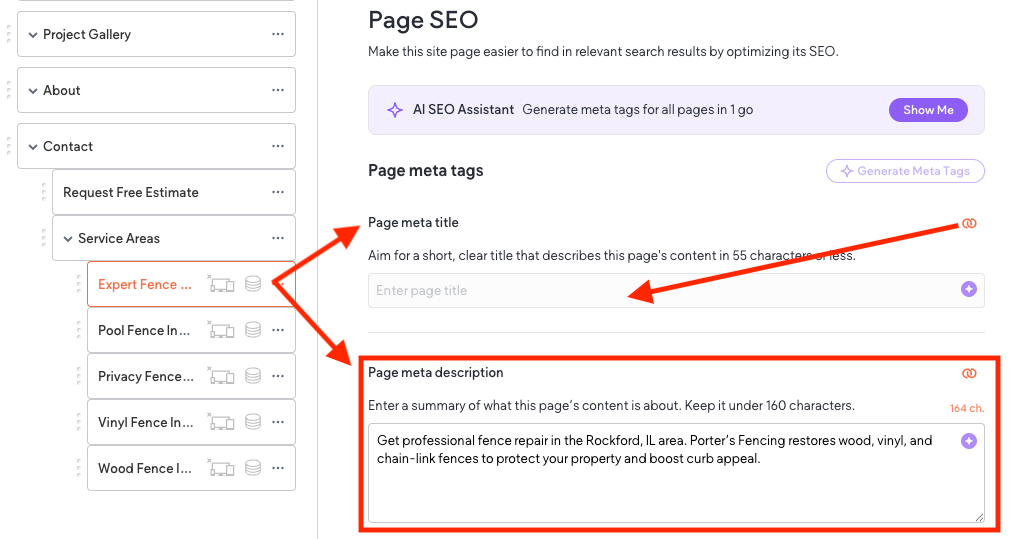
SAP title tags are dynamically generated using the Collection connected to the PSAP.
To support this:
- The Page Meta Title field must be connected to the appropriate Collection field (Title - KW01, Title - KW02, etc), in the PSAP
- The Page Meta Title box will appear blank in the page settings UI — this is correct and intentional.
- The QAE is responsible for the connecting the title tag field.
Dynamic title tags will follow the SAP formula:
-
Format:Keyword | City, ST | NOB - Example:
Basement Remodel | Media, PA | ACE Construction & Roofing
Note: No manual editing of individual SAP title tags
Meta Description Tags
Meta descriptions for Service Area Pages function differently than title tags:
- Only one meta description is used for the entire SAP set.
- This description is added at the PSAP level in the copywriting tool and is inherited by every SAP.
- QAE are responsible for editing the meta description for clarity and character count.
- SAP meta descriptions do not include individual city or town names.
- They reflect the
broader service region (ex header / main hero geo), not a specific city–state pair.
Note:
Meta descriptions do not directly influence SEO rankings. Their purpose is to increase click-through rate by providing a clear, compelling summary in search results. Because SAPs dynamically insert city and state into the title tag and on-page content, the meta description must stay general to the region — for example, “throughout the South Jersey area” or “across the DFW metroplex.”
For this reason, meta descriptions differ depending on whether the business travels to the customer or customers travel to the business.
A. Meta Description Patterns — Service-Based Businesses
- Businesses that travel to the customer: HVAC, plumbers, electricians, landscapers, etc. Use one of the following patterns at the PSAP level:
- Option 1
- “Primary CTA [NOB] for your specific keyword phrase, specific keyword phrase, specific keyword phrase throughout the [broader service region].”
- Option 2
- “Schedule your _________ (appointment, estimate, consultation, etc.) or call to speak with our team about your [keyword phrase] and related services throughout the [broader service region].”
B. Meta Description Patterns — Brick-and-Mortar - Single Location.
- Option 1
- “Visit [NOB] for [keyword phrase], [keyword phrase], and [keyword phrase] at our [HQ City] location, proudly serving the [broader service region].”
- Option 2
- “[NOB] provides trusted [keyword phrase] from our [HQ City] office, supporting customers throughout the [broader service region].”
C. Meta Description Patterns — Brick-and-Mortar - Multiple locations.
- Option 1
- “Visit [NOB] for your specific keyword phrase, specific keyword phrase, specific keyword phrase at any of our [#] locations, serving the wider [broader service region].”
- Option 2
- “Call [NOB] for your specific keyword phrase, specific keyword phrase, specific keyword phrase at our
[#] locations throughout the
[broader service region].”