
Geo Pages (GEOs)
Geo Pages (GEOs)
Effective Date: February 1, 2026
Last Updated: February 7, 2026
Hibu Policy
Geo Pages (GEOs) are intended for businesses that operate from one or more physical locations. GEOs target nearby towns or cities whose residents may reasonably travel to the business’s location.
GEOs may be used only when the client has not purchased Service Area Pages (SAPs) and do not require Local Ranking. GEOs must follow the eligibility, content, structural, SEO, and editorial standards defined in this guideline.
Product Fit & Writer Responsibility
While GEOs are designed for location-based businesses and SAPs are designed for service-area businesses, SAPs may be sold to businesses that operate from a physical location. When this occurs, writers are expected to acknowledge the business’s physical location and adjust SAP copy accordingly, while still following SAP structural and SEO requirements.
This guideline defines when GEOs are appropriate and how they must be written. When SAPs are purchased instead, GEOs are not used, and the SAP content must be modified to accurately reflect the business’s location-based model.
Related:
Service Area Pages and
SAPs vs. Geos Comparison Table
Geo Pages (GEOs): At-a-Glance
| Category | Geo Pages (GEOs) |
|---|---|
| Purpose | Rank for towns where customers travel to the business |
| Business Type | Location-based businesses with a physical address |
| Coverage Model | Travel-to-business (not radius-based) |
| Maximum Count | Up to 10 GEO Pages per business |
| Indexing | Fully indexable |
| Editing Model | Individually written and edited per GEO |
| Navigation Placement | Displayed under “Areas Served”; anchors to listing section on Contact Us page or Location Category Landing Page when Additional Locations are active |
| Hero H1 | “Additional Areas Served” |
| Hero Form Title | “GEO Hero Request Form” |
| Meta Focus | GEO keyword + city/state; must not imply physical location in target town |
| Breadcrumbs | Not displayed |
| Footer Linking | Not linked directly in footer |
Defintion
A Geo Page is a location-targeted page for brick-and-mortar businesses that serve customers from a fixed address. Each GEO Page focuses on a specific surrounding town and is written to highlight the business’s actual location while showing the extended area it serves. GEOs are individually written and edited, and each includes accurate geographic references without implying that the business is located in the target town.
Purpose / Why It Matters
Geo Pages improve visibility for businesses whose customers travel to them. A clear geographic strategy ensures:
- Increased visibility for city-and-service searches in nearby towns
- Stronger transparency aligned with Google’s EEAT framework
- Accurate representation of the business’s true physical location
- Improved trust and user experience for consumers evaluating travel distance
Eligibility & Requirements
- Up to 10 Geo Pages per business
- Must have Hibu One (Local Ranking is not required)
- Cannot be sold when SAPs are active or being purchased
Structure & Generation
Each Geo Page must:
- Include a unique geographic reference in body copy
- Clearly state where the business is actually located
- Clarify that the business serves the target town (not that it is located there)
- Include location-specific SEO across:
- Title tag
- Meta description
- H1
- Body copy
- Breadcrumbs do not display on GEOs.
- Related Services links do not display on GEOs
Writing Guidance
Geo Pages must:
- Clearly identify the actual location(s)
- Clarify that the business serves the target town, not that it is located there
- Reinforce physical location accuracy to avoid misleading users and violating EEAT best practices
Encouraged phrasing
- “While our office is located in New Rockbridge, we proudly serve clients in Concord.”
- “With locations in Cranston, Warwick, and East Greenwich, we’ve been serving the Landsdowne area for over 25 years.”
- “Our Portsmouth office supports customers in Londonderry and the surrounding region.”
Avoid
- “Located in [Geo Town]” if untrue
- Any language that suggests a nonexistent physical office
- Copy-pasting content between GEOs
Duplicate Content Controls
- Each GEO Page is individually edited to avoid duplication through:
- Unique geographic references in body copy
- “Located in HQ City, serving Geo Town” phrasing
- Manual review and editorial edits
- Page-specific SEO tags
- No copy/paste content reuse across GEOs
Navigation & Linking
GEO Pages must be accessible through site navigation and presented in a consistent, structured format. The placement of GEO links depends on whether the site uses the Additional Locations add-on.
Anchored GEO Section Requirements (All Sites)
Regardless of placement, the anchored GEO section must include:
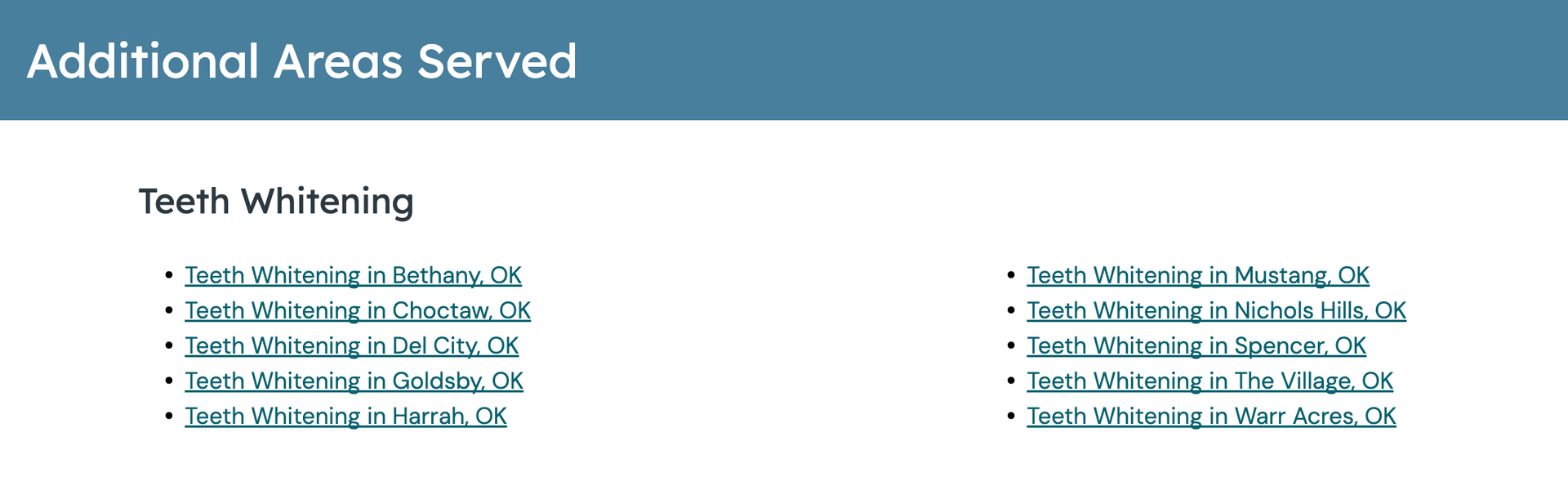
- A thin hero with the headline: “Additional Areas Served”
- GEO links formatted using one of the following patterns, based on keyword context:
- Standard format: “[Keyword Term] in [City, ST]”
- Location-implied keyword exception: “[Keyword Term] Serving [City, ST]”
- GEO links displayed in columns of five whenever possible
When the number of GEOs does not divide evenly, the Build Team is responsible for balancing the columns (for example, 7 GEOs displayed as 4 and 3).
Location-Implied Keyword Rule
If the selected keyword inherently implies a physical location (for example, “Chocolate Store” or “Dentist Office”), the “Serving [City, ST]” format must be used to avoid misleading users about the business’s physical address.
This rule applies to all GEO Pages, regardless of navigation placement.
Sites Without Additional Locations
When a site does not use the Additional Locations add-on:
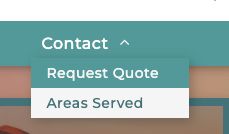
- GEO links are accessed through the Contact Us navigation item
- A dedicated “Areas Served” sub-navigation item appears beneath Contact Us
- The “Areas Served” link anchors to the GEO section located on the Contact Us page
In this scenario:
- The Contact Us page serves as the primary destination for both contact information and GEO discovery
- GEO Pages supplement the site without introducing location-based navigation
This is the standard GEO configuration for single-location sites.
Sites With Additional Locations
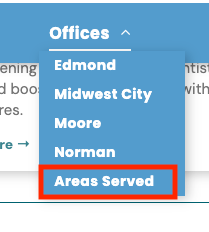
When a site uses the Additional Locations add-on:
- GEO links are not placed under Contact Us
- A dedicated “Areas Served” navigation item appears under the “Locations” or “Offices” menu
- The “Areas Served” link anchors to the GEO section on the Location Category Landing Page
In this scenario:
- A standalone Contact Us page is not used
- Users are directed to select a location context first
- GEO Pages remain accessible without conflicting with multi-location navigation patterns
The anchored GEO section on the Location Category Landing Page:
- Mirrors the standard GEO presentation defined above
- Displays up to 10 GEO Pages
- Links directly to individual GEO Pages
GEO Hero Form Requirements
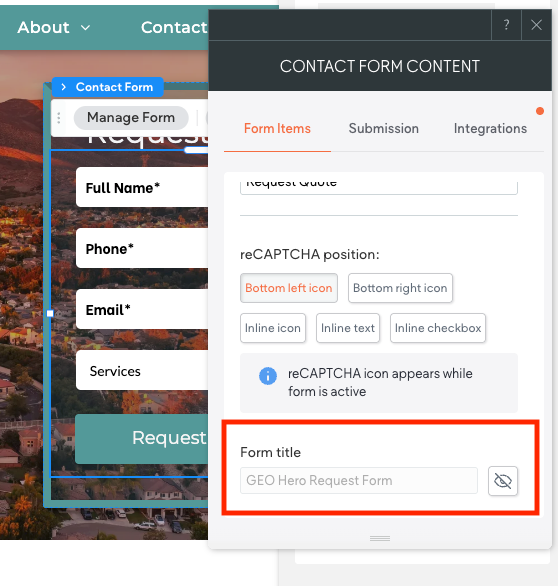
If a Geo Page includes a form placed in the hero section, the form title must clearly identify the lead as originating from a GEO Page. To ensure accurate tracking in the client’s dashboard, the standard “Hero Request Form” title must be updated to:
“GEO Hero Request Form”
The hero form must be
temporarily unhidden, the word
GEO added to the beginning of the form title, and then the form must be
re-hidden.
A
grayed-out form title confirms it is correctly hidden.
The
CW
is responsible for updating this form title.
This ensures:
- GEO leads are identifiable in the client dashboard
- Reporting separates GEO form fills from other page types
- Accurate attribution for area-based lead generation
GEO Page URL Structure
All Geo Pages must use the standardized GEO slug format.
The URL always begins with /location/ and follows this structure:
-
contact/[geo-keyword-term]-[city-st]
Approved examples:
-
/contact/teeth-whitening-bear-de -
/contact/teeth-whitening-glasgow-de -
/contact/teeth-whitening-newark-de
Title and Meta Description Formatting (GEOs)
Title Tag Requirements (GEOs)
- Format: GEO Keyword | City, ST | NOB
- Example: Teeth Whitening | Drexel Hill, PA | Kim's Dental
If the title tag is too long:
- Remove punctuation and vertical pipes
- Remove NOB
Priority remains on GEO keyword + City, ST
Meta Description Tags
Meta descriptions for GEOs are written manually and should:
- Follow the standard homepage meta style
- Include Geo Town when relevant
- Stay under 160 characters
- Avoid implying physical location in the target town
A. Single-Location Brick-and-Mortar
- Option 1
- “Primary CTA [NOB] for your [keyword phrase] and related services throughout the [Regional Area Name].”
- Option 2
- “Visit [NOB] or call today for [keyword phrase] and more throughout the [Regional Area Name].”
- Option 3
- “Schedule your [form type] or call our team for [keyword phrase] across the [Regional Area Name].”
B. Multi-Location Brick-and-Mortar
- Option 1
- “Primary CTA [NOB] for your [keyword phrase] across all our [Location Count] locations throughout the [Regional Area Name].”
- Option 2
- “Visit [NOB] or call tday for [keyword phrase] supported by our locations throughout the [Regional Area Name].”
- Option 3
- “Schedule your [form type] or call our team for [keyword phrase] at any of our locations throughout the [Regional Area Name].”