
Additional Locations
Additional Locations (Multi-Locations)
Effective Date: February 1, 2026
Last Updated: February 8, 2026
Related Definitions
For additional context, see:
Hibu Policy
Additional Locations, also referred to as Multi-Locations, is a paid add-on product within Hibu One Smart Sites.
When this add-on is present on a site, it indicates the product has been purchased and validated through Hibu’s ordering system. Additional Locations enable a single website to support multiple real, physical business locations through structured, location-specific pages.
Additional Locations represent legitimate, customer-facing business locations. They are not used for service areas, SEO-only city targeting, or virtual offices.
Additional Locations: At-a-Glance
| Category | Behavior / Rule |
|---|---|
| Product Structure | Enables multiple physical business locations under one Smart Site. |
| Header | Product-specific header configuration is required. A standard header must not be modified to replicate Additional Locations behavior. Header content remains business-level and may not include individual location names or city-level GEO references. |
| Location Category Landing Page | Serves as the directory of all physical locations. Links to individual Location Profile Pages. |
| Location Profile Pages | One page per physical location. Displays location-specific content and contact information. |
| GEO Pages | Associated with individual locations and routed according to product framework. |
| Contact Information | Address, phone, hours, and map displayed per location. Data populated via connected sources. |
| Reviews | Each Location Profile Page displays reviews tied to its specific merchant ID. Multiple merchant IDs are expected when applicable. Reviews are not aggregated across locations. |
| Forms / CTA | Each Location Profile Page contains a product-specific form unique to that branch. A hidden form page supports routing and configuration but is not visible in navigation. CTAs anchor to the on-page location form. |
| Navigation Logic | Location routing and dropdown behavior are controlled by the product framework and may not be custom-built or overridden. |
| Device Consistency | Rules apply across desktop, tablet, and mobile experiences. |
Definition
Additional Locations (Multi-Locations) is a paid add-on product that creates Location Profile Pages for each physical business location beyond the primary location, while maintaining a single, unified website experience.
What Additional Locations Create
When the Additional Locations add-on is active, the site includes:
- A Locations Category landing page
- Location Profile Pages for each location
- Location Cards displayed where applicable
- Location entries in site navigation and footer
Each Location Profile page supports:
- Location-specific address and contact details
- Location-specific unique content and imagery when provided
- Location-level CTAs and routing
Naming Conventions
Location labeling is based on business type to align with customer expectations.
Use “Locations” (default) for:
- Auto repair shops
- Salons and spas
- Retail stores
- Restaurants
- Other storefront-style businesses
Use “Offices” (by exception) for:
- Law firms
- Medical practices
- Dentists
- Chiropractors
Using industry-appropriate terminology reinforces professionalism, trust, and clarity.
Header Behavior
When the Additional Locations product is active, header content must remain intentionally generic and must not surface individual location detail. The header represents the business as a whole, not any single branch.
The product-specific header configuration is required when Additional Locations is active. A standard Smart Site header must not be edited or restructured to replicate Additional Locations behavior. Header structure, navigation logic, and dropdown functionality are controlled by the Additional Locations product framework and are not custom-built or adjusted per site.
(updated for clarity 2/12/26)
To avoid misleading GEO emphasis, visual clutter, routing inconsistencies, and inconsistent experiences across devices, the following rules apply:
- Individual location names must not appear in the header
- City-level GEO references must not appear in the header
- Headers must not include lists, rollups, or implied groupings of locations
- Header content must remain concise and business-level in scope
These rules apply across all supported header patterns (desktop, tablet, and mobile). Location-specific detail is intentionally reserved for the Location Category Landing Page and Location Profile Pages.

Navigation Behavior
When the Additional Locations add-on is active, primary navigation behavior changes to prioritize location discovery over generic contact access.
Top-Level Navigation Label
- The standard “Contact Us” navigation item is replaced with “Locations” or “Offices”, based on business type.
- This label must align with the Naming Conventions defined for the site.
- “Contact Us” is not used as a top-level navigation item when Additional Locations are present.
This ensures users are directed to location selection first, rather than a generic contact destination.
Navigation Dropdown Behavior
When a dropdown is supported:
- Dropdown items list city names only
- Each city links to the corresponding Location Profile Page
- Location names must be concise and avoid additional descriptors beyond the city name
Example dropdown pattern:
- Battle Ground
- Camas
- Vancouver
This structure allows users to quickly identify and access the most relevant location without overwhelming the navigation.
About Content Behavior
When the Additional Locations add-on is active, a dedicated, standalone About Us page is not used.
Instead, an
About folder replaces the About Us page. The folder serves as the primary destination for trust and informational content and functions similarly to the traditional About Us experience.
The About folder may include:
- FAQs
- Blog
- Reviews
- Other informational or trust-related content
Location-specific About content sourced from Yext is displayed on each
Location Profile Page, ensuring that About messaging reflects the context of the individual location rather than the business as a whole.
Areas Served (GEO Pages) Behavior
When a client has purchased Geo Pages (GEOs) alongside the Additional Locations add-on, the placement and navigation of GEO links changes to align with the multi-location site structure.
Navigation Placement
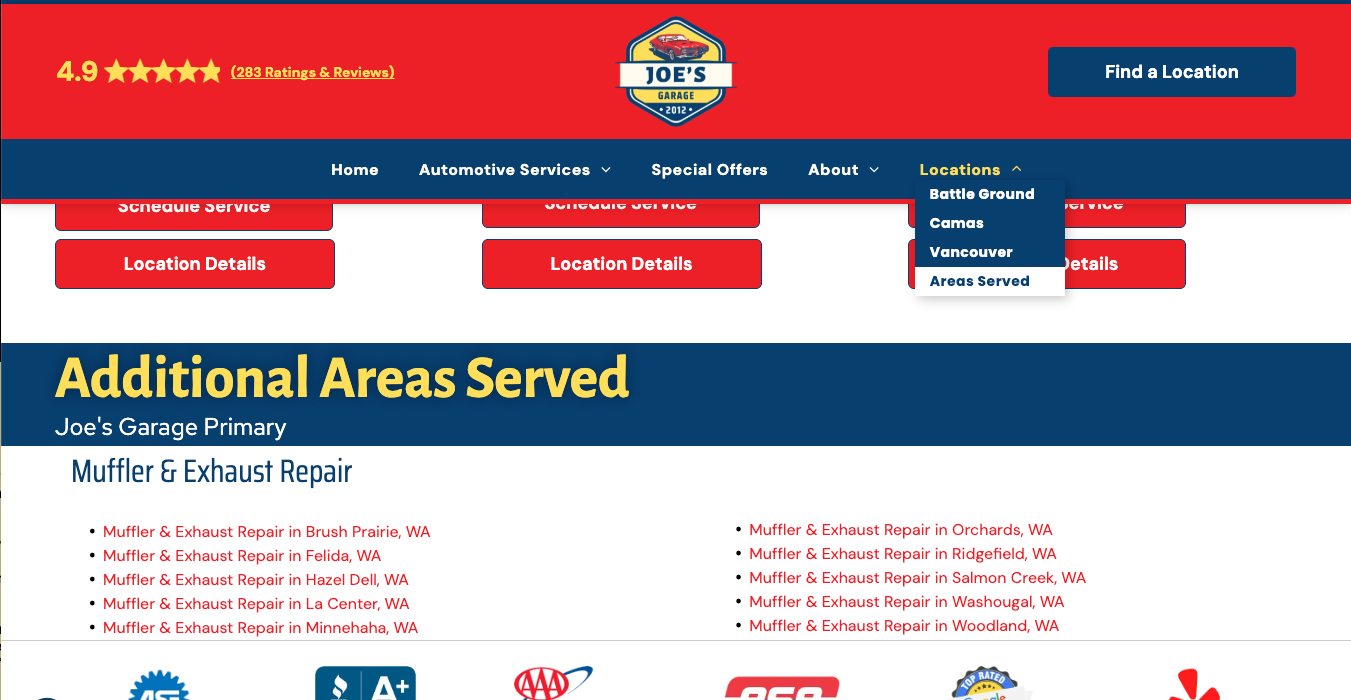
- A dedicated “Areas Served” navigation item appears under the “Locations” or “Offices” menu
- “Areas Served” is not placed under a Contact Us navigation item, as a standalone Contact Us page is not used when Additional Locations are active
This ensures GEO content remains discoverable while prioritizing location selection first.
Anchor Destination
- The “Areas Served” navigation item anchors to an Areas Served section on the Location Category Landing Page
- This section mirrors the standard GEO presentation used elsewhere, but its placement reflects the absence of a Contact Us page
Areas Served Section Behavior
The Areas Served section:
- Displays up to 10 GEO Pages
- Uses a thin hero-style layout consistent with GEO Page standards
- Lists GEO links in a clear, scannable format
- Links directly to individual GEO Pages

Header Phone Behavior (Overview)
When the Additional Locations add-on is active, header phone behavior adapts based on how phone numbers are configured across locations. This ensures a clear and predictable experience across desktop, tablet, and mobile devices.
Shared Phone Number Across All Locations
When all locations use the same phone number:
- Desktop:
The phone number displays as a click-to-call button in the header, following standard desktop header behavior. - Mobile:
The phone number displays as a click-to-call button, following standard mobile header behavior. - Tablet:
A Contact-style button is displayed instead of a phone number.
This button links to the Location Category Landing Page.
The Contact-style button label is selected by the copywriter based on business type and audience expectations (for example, “Find a Location,” “Find an Office,” or “Contact Us”).

Unique Phone Numbers Per Location
When locations use different phone numbers:
- Desktop, Tablet, and Mobile:
No phone number is displayed in the header. - A Contact-style button is displayed in the header instead.
- The button links to the Location Category Landing Page, allowing users to select the appropriate location.
- The button label is selected by the copywriter and should reflect the business vertical and customer intent.
CTA Consistency Requirement
To maintain clarity and professionalism, CTA language must remain consistent across the site.
If the header uses a label such as “Find a Location” or “Find an Office,” that same phrasing should be used in prominent CTAs elsewhere (such as the hero section). Mixed or contradictory CTA language is not permitted, as it creates confusion about destination and intent.
Hero GEO H2 Behavior
The Hero GEO H2 is the only approved header-level area where limited location referencing is permitted when the Additional Locations add-on is active.This allowance is intentionally constrained to balance clarity, SEO intent, and visual hierarchy.
Location Reference Limits
- The Hero GEO H2 may reference up to two locations or offices by name
- When referencing more than two locations, the Hero GEO H2 must use aggregate or descriptive phrasing
- Listing or rolling up multiple city names beyond two locations is not permitted
This rule applies regardless of business type, industry, or service area size.
Approved Usage Patterns
- Direct reference (maximum of two):
- Serving Portland and Vancouver
- Offices in Boston and Cambridge
Aggregate or descriptive reference (required when more than two):
- Four Convenient Offices to Serve You
- Three Offices in New Hampshire
- Three Convenient Local Locations
- Multiple Locations Across Southern California
Aggregate phrasing may reference:
- Total number of locations
- A state, region, or general service area
- Descriptive terms such as “local,” “convenient,” or “near you”
Not Allowed in the Hero GEO H2
- Listing more than two city names
- Long-form city strings or comma-separated locations
- Repeating navigation-style location lists
- Using the Hero GEO H2 as a substitute for the Location Category Landing Page
Location discovery and selection must occur on the
Location Category Landing Page, not in the hero.
Location Category Landing Page
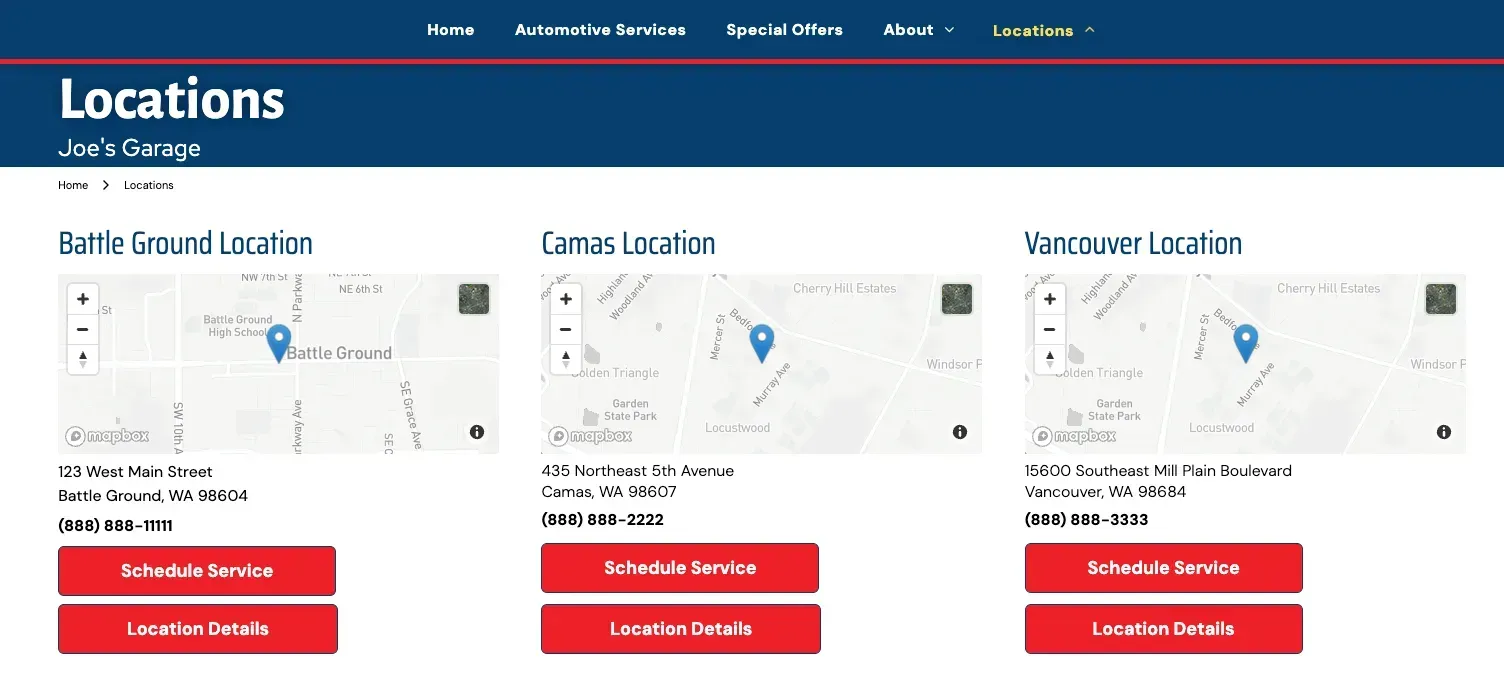
The Location Category Landing Page provides a centralized overview of all business locations.
Key characteristics:
- Page Title (H1): Displays “Locations” or “Offices,” based on business type
- Location Cards list each location by city
- Each card includes address, phone number, and primary CTA
CTAs:
- Request-style CTA (e.g., Schedule Service, Request Appointment) linking to the corresponding Location Profile Page
- Location Details CTA linking to the full Location Profile Page
- This layout allows users to quickly identify and access the most relevant location.
Location Profile Page Overview
A Location Profile Page provides detailed, location-specific content focused on a single business location. Core sections include:
Introduction
- Business name + city
- Localized service messaging
- Location-relevant imagery
Contact Information
- Address, phone, hours, and map
- Data populated via connected sources
- Request CTA anchored to the form section
Reviews
- Populated via the Hibu Reviews widget
- Each Location Profile Page displays reviews tied to its specific merchant ID
- Additional Locations sites are expected to support multiple merchant IDs when applicable (added 2/12/26)
- Reviews are not aggregated across locations (added 2/12/26)
Optional Sections (when content is provided):
- Gallery
- Menu or price list
- Team
About Section
- Data-driven content modeled after the main About page
Request / Contact Form
- Product-specific form unique to each location
- Tied to that individual branch
- CTAs throughout the page anchor to this form (added 2/12/26)
- A hidden form page supports routing and configuration but is not visible in site navigation (added 2/12/26)

Footer Location Display
The footer provides persistent access to location-specific information and must present each location in a consistent, structured format.
Each location displayed in the footer includes:
- Location Name (Headline):
Displays the full location name (for example, “Vancouver Location”).
This must match the H1 used on the corresponding Location Profile Page and is entered manually. - Contact Information:
Displays the street address and phone number for the location.
This information is dynamically populated from connected data sources.
All phone numbers are displayed, even when multiple locations share the same number. - Call-to-Action Button:
Labeled either “Location Details” or “Office Details.”
The label is entered manually.
The button links directly to the corresponding Location Profile Page.
Not Included in the Footer
- Call or text buttons are not included in this layout
- Footer CTAs must not link directly to forms or alternate destinations
- The footer always points users to the appropriate Location Profile Page, preserving a clear and consistent navigation path.