Geo Display Rules

GEO Display Rules – Header, Hero, Title, and Page Content

Effective Date: February 1, 2026   Last Updated: February 8, 2026

Related Definitions

For additional context, see:

Hibu Policy

This definition establishes the authoritative rules for how geographic (Geo) information is displayed across Hibu One websites.


These rules exist to ensure:

  • Clear and consistent Geo messaging for users
  • Alignment across header, hero, title tags, and page content
  • Compliance with listings data, search platforms, and SEO best practices
  • Predictable behavior across different location and service-area scenarios


Hibu policy requires that:

  • Header Geo, Hero Geo, and Title Tag GEO remain aligned
  • Geo decisions are based on verified Yext listings data
  • The number of locations or service areas determines the allowed Geo approach
  • Product-based behavior (Additional Locations) overrides standard count-based rules
  • Geo display rules may change as Google and other platforms evolve


The
Quick Reference Guide below provides a fast, decision-ready summary of these rules. Detailed explanations and examples follow.
Note: If the client is already ranking locally and local SEO has been added, the header, hero geo reference, and title tag may differ slightly to support those rankings.

Geo Display Rules:  At-a-Glance

Scenario Header Geo Hero Geo Title Tag Meta Description
Single Location One city/county/region Same geo as header Same geo as header May expand, must remain accurate
Single Service Area One city/county/region Same geo as header Same geo as header May expand, must remain accurate
Two Locations Two locations allowed Must match header Primary location only May include both locations
Two Service Areas Two service areas allowed Must match header Primary area only May include both service areas
Three+ Locations Numeric or regional language only Must match header Primary location only May list multiple or use regional terms
Three+ Service Areas Primary area + “and surrounding areas” Must match header Primary area only May list multiple or use regional terms
Additional Locations Product No geo copy in header Page-specific location allowed Page-specific location Expanded detail allowed

Definition

Geo Display Rules define how and where geographic references (city, county, region, or service area) may appear across a website, including:

  • Header
  • Hero Geo
  • Title tag
  • Meta description
  • Body copy

Important Note on Google & Search Platform Behavior

Search platforms, including Google, regularly change how they interpret and enforce location signals. These changes can impact search visibility, listings compliance, and account standing.


Hibu may update geo display rules at any time to remain aligned with search platform requirements and best practices. Teams should treat these rules as authoritative but subject to change.

Listings (Yext) Alignment (Non-Negotiable)

All Header Geo and Hero Geo content must be fully aligned with the business’s Yext listings.


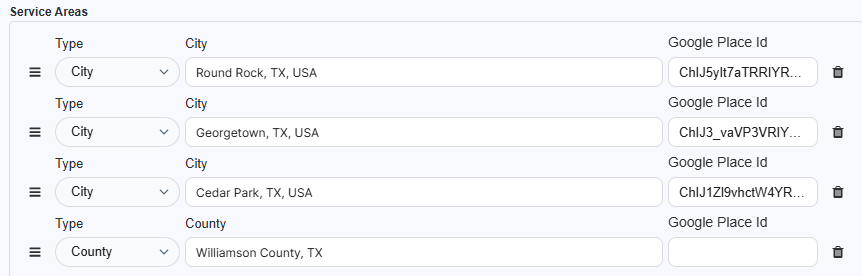
Any city, area, or region shown in the Header Geo or Hero Geo must already exist in Yext as:

  • A physical location, or
  • A defined service area
  • Important: If a location or area is not present in Yext, it cannot be displayed in the header or hero.
  • Important: Generalized, implied, or legacy regional phrases carried over from older Hibu websites (for example, “Serving the Greater Austin, TX Area”) are not permitted in the Header Geo, Hero Geo, or Title Tag unless they are explicitly supported by Yext.
  • Geographic areas used for header or hero display must be selected in Yext using one of the supported Service Area fields (City, County, or State/Region). Areas entered manually or outside the preset Yext fields are not valid for header or hero Geo usage.

Primary vs. Secondary Geo

Primary Geo (Strict)

  • Header
  • Hero Geo
  • Title tag
  • Rules:
  • Header and Hero Geo must remain aligned in meaning.
  • Header and Hero Geo text should align in meaning, not require exact text matching. Minor variations such as ampersands vs. “and,” abbreviations, or spacing adjustments are acceptable to accommodate layout and space constraints.
  • The wording, scope, and geography must be the same.
  • Title tag Geo must align with the same geographic reference.


Secondary Geo (Flexible)

  • Meta descriptions
  • Body copy
  • Rules:
  • May reference broader or additional service areas.
  • May include regional language (for example, “The Corridor” or “Central Ohio”).
  • Must not imply physical locations that do not exist.

Location & Service Area Geo Rules

These rules apply equally to businesses with physical locations and businesses that serve defined service areas.

Single Location or Single Service Area

  • Display one Geo only (city, county, or region).
  • Geo must be supported by Yext.
  • The same Geo must appear in:
  • Header
  • Hero Geo
  • Title tag


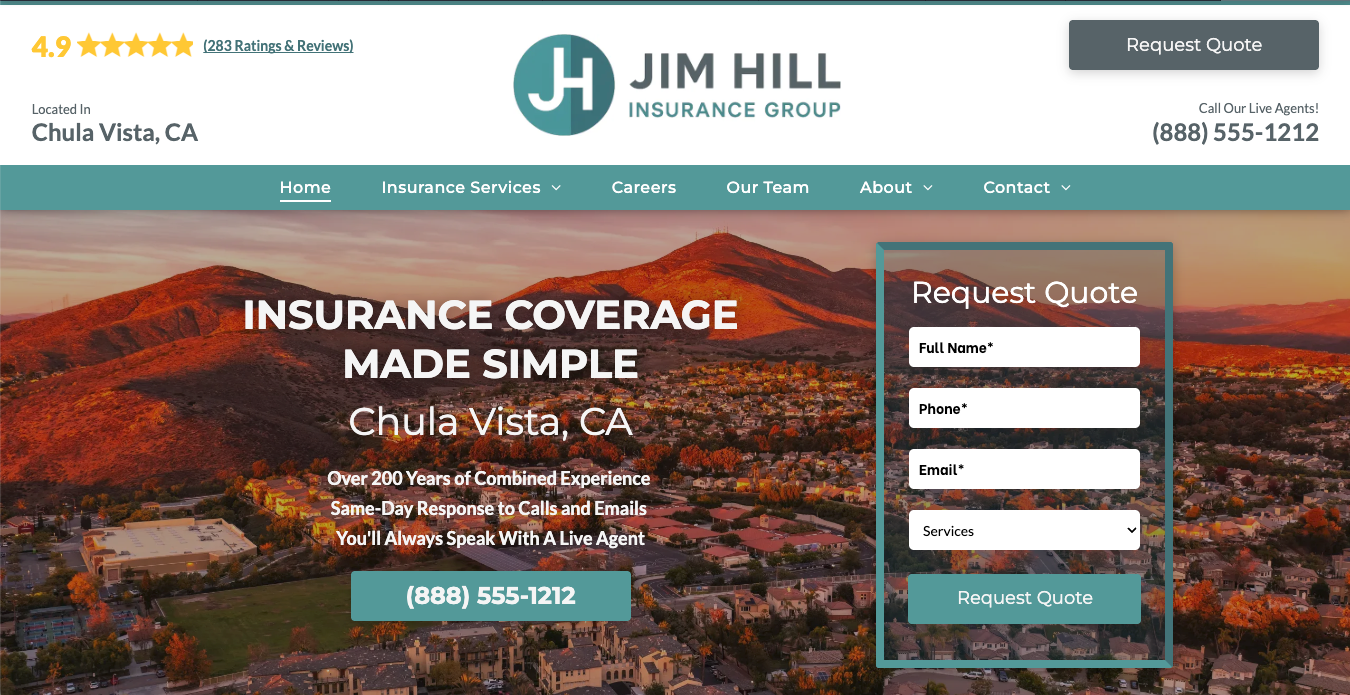
Example text – Physical Location

  • Header Geo: Serving Chula Vista, CA
  • Hero Geo: Insurance Coverage Made Simple | Chula Vista, CA
  • Title tag: Insurance Agency & Coverage | Chula Vista, CA | Jim Hill Insurance Group
  • Meta description: Jim Hill Insurance Group provides personalized commercial and personal insurance coverage in Chula Vista, CA. Same-day responses and licensed agents.


Example text – Service Area

  • Header Geo: Serving the Asheville, NC Area
  • Hero Geo: Home Exterior Services in the Asheville, NC Area
  • Title tag: Home Exterior Services | Asheville, NC | Stella Home Builder
  • Meta description: Stella Home Builders provides home exterior services throughout the Asheville, North Carolina area.

Two Locations or Two Service Areas

Two is the maximum number of locations or service areas that may be named in primary Geo surfaces.

  • Allowed for businesses with:
  • Two physical locations, or
  • Two defined service areas
  • No additional locations or service areas may be referenced.
  • Header and Hero Geo must remain aligned in meaning.
  • Header and Hero Geo  text should align in meaning, not require exact text matching. Minor variations such as ampersands vs. “and,” abbreviations, or spacing adjustments are acceptable to accommodate layout and space constraints.


Title Tag Guidance (Two Locations / Service Areas)

  • Title tags should use the primary address listed in the questionnaire.
  • This is typically the first (primary) address provided and represents the business’s main location.
  • Do not select a city from additional locations or secondary service areas when determining title tag Geo.
  • If questions arise, default to the primary address shown in the questionnaire and resolve exceptions on the back end.
  • Do not attempt to abbreviate or compress multiple locations.


Meta Description Guidance (Two Locations / Service Areas)

  • Meta descriptions may reference both locations or service areas if space allows.
  • Broader or supporting geographic language is acceptable.


Example text – Physical Locations (2)

  • Header Geo: Located in River Hills, WI and West Bend, WI
  • Hero Geo: Veterinary Care in River Hills, WI and West Bend, WI
  • Title tag: Veterinary Care & Pet Services | River Hills, WI | Good Mojo Pet Care
  • Meta description: Good Mojo Pet Care provides veterinary and pet care services in River Hills and West Bend, WI, welcoming new patients and offering same-day visits.


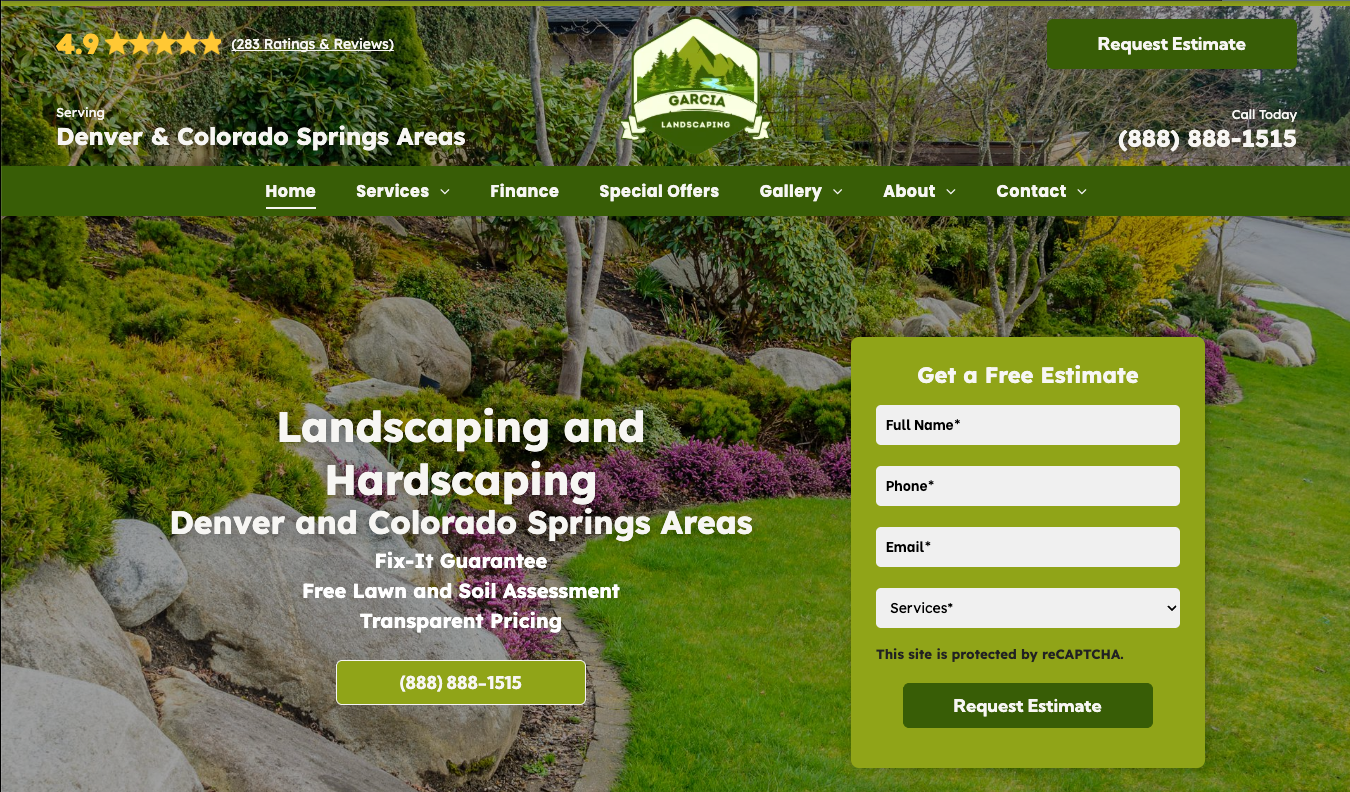
Example text – Service Areas (2)

  • Header Geo: Serving Denver and Colorado Springs Areas
  • Hero Geo: Landscaping and Hardscaping in Denver and Colorado Springs Areas
  • Title tag: Landscaping & Hardscaping | Denver, CO | Garcia Landscaping
  • Meta description: Garcia Landscaping provides professional landscaping and hardscaping services throughout the Denver and Colorado Springs areas, including lawn care, design, and outdoor improvements.

Three or More Locations or Service Areas

When a business has three or more locations or service areas, listing individual geographies in the header or hero creates readability and layout issues. At this scale, Geo must shift to numeric or generalized language.


Rules:

  • Do not list multiple cities, counties, or regions in the header or hero.
  • Header and Hero Geo must use the same generalized Geo approach.


Approved Geo approaches (3+)

For businesses with three or more locations or service areas, Geo must use regional or generalized language rather than listing individual cities.


Approved approaches include:

  • Regional Geo language anchored to a single, recognizable area
    (for example, “Serving the San Diego Area” or “Serving Multiple Locations Across Metro Denver”)
  • Primary, Yext-supported Geo paired with “and surrounding areas”
    (service-area use cases only)


Numeric-only phrasing without a geographic anchor (for example, “Serving 3 Convenient Locations”) is not permitted.


Title Tag Guidance (Three or More Locations / Service Areas)

  • Title tags should use one primary address listed in the questionnaire.
  • This is typically the first (primary) address provided and represents the business’s main location.
  • Do not select a city from additional locations or secondary service areas when determining title tag Geo.
  • If questions arise, default to the primary address shown in the questionnaire and resolve exceptions on the back end.
  • Do not list or summarize multiple locations or service areas.


Meta Description Guidance (Three or More Locations / Service Areas)

  • Meta descriptions may include multiple locations or service areas, space permitting.
  • Broader regional language is permitted if accurate and Yext-supported.


Allowed examples:

The following examples illustrate acceptable header Geo phrasing for businesses with three or more physical locations.

In all cases, the geographic area referenced
must be supported by Yext (as a defined service area, regional designation, or aggregation of listed locations).


Physical Locations (3+) — Regional (Preferred)

  • Serving Multiple Locations in the Columbus Area
  • Serving Multiple Locations Throughout the Cedar Rapids Area
  • Serving Multiple Locations Across Metro Denver
  • Multiple Locations Serving the Greater Milwaukee Area


Requirement:

  • When using a regional Geo for physical locations, at least one physical location within the referenced region must exist in Yext. The region itself must be a reasonable aggregation of listed Yext locations.


Physical Locations (3+) — Regional + Numeric (When the Number Is Important)

  • Serving the Nasville Area with 5 Locations
  • Serving the Boston Area with Multiple Locations
  • Serving Metro Denver with 4 Local Locations
  • Serving the Greater Milwaukee Area with Multiple Locations


Numeric phrasing is optional and should be used only when it adds meaningful context.
The region must remain the primary anchor, and the number should function as supporting detail.


Service Areas (3+)

  • Serving Burlington County and Surrounding Areas
  • Serving Philadelphia and Surrounding Cities
  • Serving the Asheville, NC Area and Surrounding Communities


Secondary Geo guidance:

  • Body copy may list specific locations or service areas in full.
  • Meta descriptions may be more descriptive if space allows.
  • Secondary Geo content must not conflict with Yext-supported data.
  • Location details must be communicated elsewhere on the page or site.


Example text – Multiple Physical Locations (3+)

  • Header Geo: Serving the Chula Vista Area with Multiple Locations
  • Hero Geo: Serving the Chula Vista Area with Multiple Locations
  • Title tag: Insurance Agency & Coverage | Chula Vista, CA | Jim Hill Insurance Group
  • Meta description (preferred): Jim Hill Insurance Group provides personalized commercial and personal insurance coverage with offices in Chula Vista, National City, and San Diego, CA.
  • Meta description (fallback): Jim Hill Insurance Group provides personalized commercial and personal insurance coverage with offices throughout the Chula Vista area, including San Diego and National City.


Example text – Multiple Service Areas (3+)

  • Header Geo: Serving Buncombe County and Surrounding Areas
  • Hero Geo: Home Exterior Services in Buncombe County and Surrounding Areas
  • Title tag: Home Exterior Services | Buncombe County, NC | Stella Home Builders
  • Meta description: Stella Home Builders provides roofing, siding, and exterior home services throughout Buncombe County, including Asheville, Black Mountain, Weaverville, and surrounding areas.

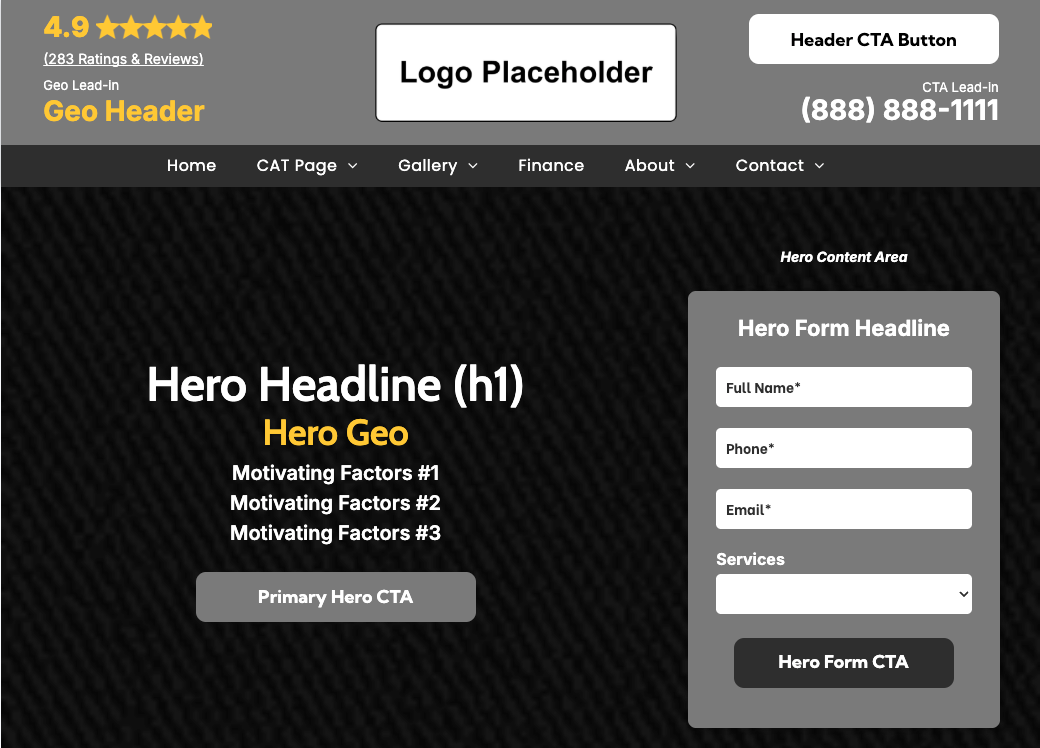
Line-Wrapping Guidance

Historically, Header Geo text was restricted to a single line. As Geo requirements have evolved—particularly with the approved use of phrases like “and surrounding areas”—a two-line Geo is now permitted when necessary.

This allowance applies to businesses with two or more locations or service areas and is an intentional exception, not a default behavior.


Rules

  • Geo text may wrap to a second line when required by character length.
  • Two-line Geo usage is most commonly expected when:
  • Displaying two locations or two service areas, or
  • Using approved phrases such as “and surrounding areas” for three or more service areas
  • Designers should not force wrapping for visual preference alone.


Visual Alignment Requirement (Critical)

When Geo text wraps to a second line:

  • The CTA lead-in (for example, “Call Now”) and
  • The primary phone number must be vertically aligned with the second line of the Geo, not the first.


This alignment:

  • Preserves visual balance within the header
  • Prevents the layout from feeling top-heavy
  • Maintains a clear visual relationship between Geo context and conversion elements


Misaligned CTAs or phone numbers are considered a
design defect and must be corrected.

Additional Locations Product Behavior

The Additional Locations product changes how location information is displayed in the header and hero, regardless of whether a business has two locations or more.


When the Additional Locations product is active:

  • Individual location names are not displayed in the Header Geo
  • The Header Geo follows the Additional Locations header configuration, not standard one-, two-, or three-location Geo rules.
  • Locations are represented through:
  • Location Category Landing Pages
  • Approved location cards placed within page content
  • When the Additional Locations product is active, the Hero Geo may reference locations only in an aggregate or descriptive manner (e.g., number of locations, “local offices,” or general service area). Individual location names or city-level Geos must not be listed in the Hero Geo.
  • Four Convenient Offices to Serve You
  • Three Offices in New Hampshire
  • 3 Convenient Local Locations


Key clarifications:

  • Additional Locations behavior is product-based.
  • A business may have the Additional Locations product with only two locations.
  • When Additional Locations is active, its header rules take precedence over standard two-location and three-location Geo rules.