
JB Mobile Hero
JB Mobile Hero
Effective Date: February 1, 2026
Last Updated: February 1, 2026
Hibu Policy
The JB Mobile Hero is a preconfigured mobile-only hero section available in standard and row-based layouts, each with optional form inclusion. It is delivered through two hero sections—JB Mobile Hero – STD and JB Mobile Hero – ROWS—located in the Heroes section folder. It may only be used when explicitly requested by a client or sales representative and must be applied consistently across all eligible pages once enabled.
The JB Mobile Hero replaces the existing mobile hero presentation without affecting desktop or tablet layouts.
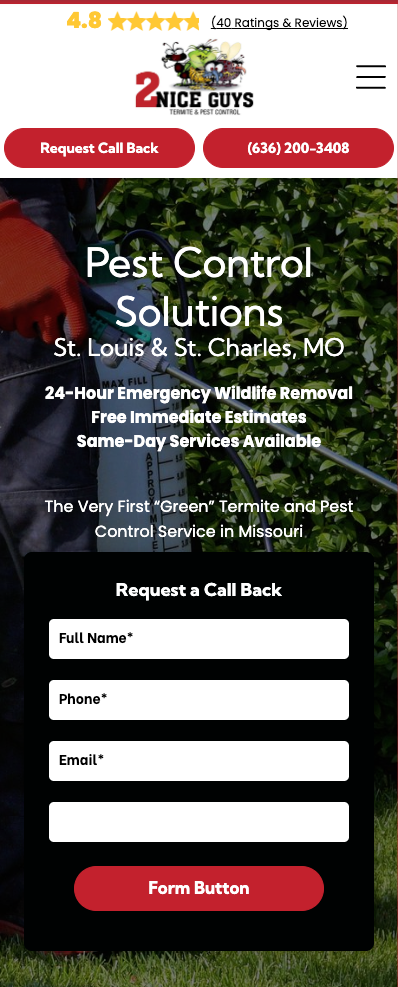
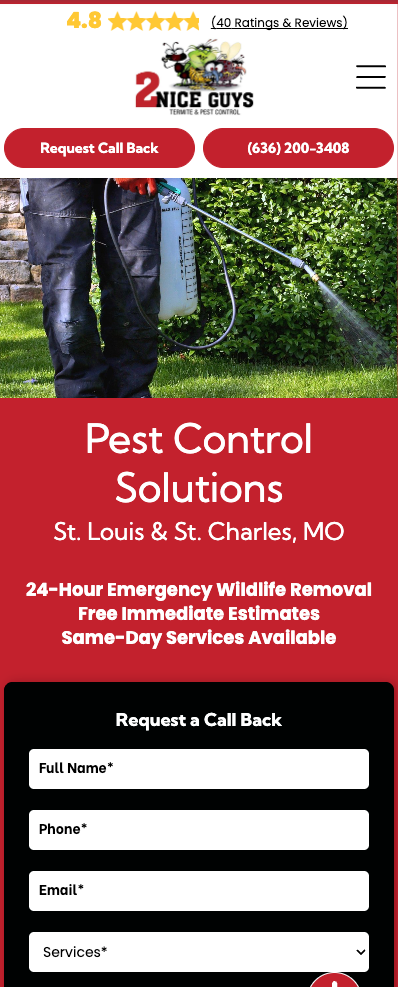


JB Mobile Hero: At-a-Glance
| Category | Rule |
|---|---|
| Availability | Mobile only; hidden on desktop and tablet views by default |
| Usage Trigger | Allowed only when explicitly requested by a client or sales rep |
| Supported Layouts | Standard and Rows |
| Form Support | Each layout supports both With Form and No Form |
| Section Structure | Two sections: JB Mobile Hero – STD and JB Mobile Hero – ROWS |
| Section Location | Located in the Heroes section folder, at the bottom of the list |
| Component Behavior | All hero elements are fully connected and must remain aligned |
| Heading & Effects | Original H1 and H2 formatting must be matched; shadow effects must be removed |
| Header Style (Mobile) | Transparent headers are not supported; mobile must use the standard (non-transparent) header style |
| Eligible Pages | Homepage, Category Landing Pages, Core Pages, SAPs, GEO Pages |
| Header Height | Maximum 220px (mega menu exempt) |
| Replacement Rule | Existing mobile header must be hidden, not deleted |
| Consistency | Must be applied to all eligible pages once enabled |
Definition
The JB Mobile Hero is a preconfigured mobile hero section available in standard and row-based layouts, with optional form inclusion. Each JB Mobile Hero variation is a fully connected unit that ties together hero imagery, metadata, headings, and form behavior into a single system.
These sections are hidden on desktop and tablet by default and are intended exclusively for mobile presentation.
Supported JB Mobile Hero Variations
The JB Mobile Hero is delivered through two section types:
- JB Mobile Hero – STD
- JB Mobile Hero – ROWS
Each section supports both configurations:
- With Form
- No Form
These are not separate sections. Each JB Mobile Hero section contains both form and no-form options and must be treated as a single, connected system.
Core Rules & Constraints
Usage Eligibility
- The JB Mobile Hero may only be added when explicitly requested by a client or sales representative.
- Once applied, it must be used consistently across all eligible pages.
- Partial or one-off usage is not allowed.
Eligible Pages
JB Mobile Hero sections may only appear on:
- Homepage
- Category landing pages
- All core pages
- SAPs
- GEO pages
No other page types may use the JB Mobile Hero.
Connected Component Rule (Critical)
All elements within a JB Mobile Hero are inherently connected, including:
- Background image
- Hero image
- Title tag
- Meta description
- Headings
- Form (when applicable)
- Form data behavior
These elements must be treated as a single unit. Mixing components from different hero types or breaking these connections is not allowed.
Heading Size Alignment
- H1 and H2 sizing in the JB Mobile Hero is not inherited from mobile settings.
- Heading sizes must visually align with the original hero being replaced.
- Text shadow effects on the JB Mobile Hero must be disabled.
Header & Layout Requirements
- Maximum mobile header height remains 220px.
- The expanded mega menu is exempt from this height restriction.
- If the site uses a transparent header, the “Overlap First Section on Page” setting must be disabled on mobile to maintain consistency with internal pages.
Header Style Behavior (Transparent Headers)
Transparent headers are not supported when using the JB Mobile Hero. If a site uses a transparent header, the mobile header must switch to the standard (non-transparent) header style to support the JB Mobile Hero layout. This change applies to mobile only; desktop and tablet views continue to use the transparent header.
Header Replacement Rules
- The existing mobile header being replaced must be hidden, not deleted.
- Deleting the header is prohibited, as it would remove the header from all device views.
- Desktop and tablet headers remain unchanged.