Hidden Pages
Hidden Pages
Effective Date: February 1, 2026
Last Updated: February 1, 2026
Definition
A hidden page is a page that is available by request but not attached to the site’s global navigation. It can be accessed directly via URL and is included in the site’s total page count.
Rules and Guidelines
- Hidden pages must contain complete content and design (no placeholders).
- Hidden pages are available only by request and do not appear in global navigation menus.
- To fully hide a page, the Hibu Team must:
- Hide the page on all devices.
- Set the page to no index to prevent it from appearing in search engine results.
- Hidden pages are included in the site’s total page count.
- A unique title tag must be included.
- A meta description is optional and not required.
Required Build Process
To properly hide a page:
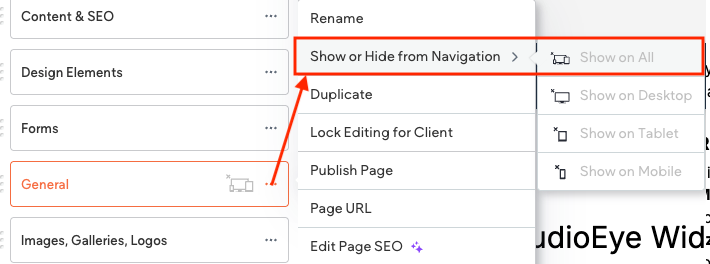
- In the page list, click the three vertical dots to the right of the page name.
- Select Show or Hide from Navigation, then choose Hide from All.
- Once hidden, a grey “hidden page” icon will appear next to the page name.
- Again, click the three vertical dots and select Edit Page SEO.
- Under SEO settings, toggle Set page to no index.
- This ensures the page will not appear in search engine results, even though it still exists in the sitemap.xml file.