
Google Tools & Tracking
Google Tools & Tracking
Effective Date: February 1, 2026
Last Updated: February 1, 2026
Hibu Policy
Hibu allows clients to connect their Hibu One Smart Site to Google tools such as Google Analytics, Google Ads, Google Tag Manager, and Google Search Console. All Google tracking must be supplied by the client and added through the Google Tools area in Duda.
Hibu does not create, own, or manage client Google accounts.
Google Tools & Tracking: At-a-Glance
| Topic | Rule |
|---|---|
| Who owns Google accounts | The client owns and manages all Google Analytics, Google Tag Manager, Google Ads, and Search Console accounts. |
| Does Hibu create Google accounts | No. Hibu does not create, own, or manage client Google accounts. |
| What Hibu will add | Client-supplied Google Analytics Measurement IDs, Google Tag Manager Container IDs, Google Ads conversion IDs, Floodlight IDs, or Search Console verification codes. |
| Client access to Google Analytics data | Once added, clients can view performance data directly in their own Google Analytics account and compare it alongside the Hibu Dashboard. |
| Where tracking is added | Google Tools tab under SEO & Settings in Duda. |
| Script or code pasting allowed | No. Full scripts or meta tags must not be pasted into site code. |
| Previous site tracking | Existing client tracking IDs must be transferred to the new Hibu One site to preserve reporting continuity. |
| Multiple tracking IDs | Supported. Client tracking and Hibu internal tracking can run together. |
| When tracking works | Tracking functions only on published, live sites. |
| Hibu internal analytics | Included on all sites for internal use only; not shared with clients. |
Definition
Hibu allows clients to connect their Hibu One Smart Site to Google tools such as Google Analytics, Google Ads, Google Tag Manager, and Google Search Console. All Google tracking must be supplied by the client and added through the Google Tools area in Duda.
Purpose / Why It Matters
Many clients rely on Google tools to review performance data or compare results with other marketing programs. Supporting client-supplied Google tracking ensures continuity, transparency, and client ownership of analytics data while allowing Hibu to maintain a consistent and secure site framework.
Client-Supplied Google Analytics Access
Hibu can add client-supplied Google Analytics or Google Tag Manager tracking to a Hibu One Smart Site to support deeper performance analysis within the client’s own Google account.
Clients must provide their Google Analytics Measurement ID or Google Tag Manager Container ID. These Google accounts are owned, accessed, and managed entirely by the client. Hibu does not create, manage, or grant access to Google accounts.
Once added, clients can view performance data directly in Google Analytics and compare it alongside reporting available in the Hibu Dashboard.
Placement in Duda
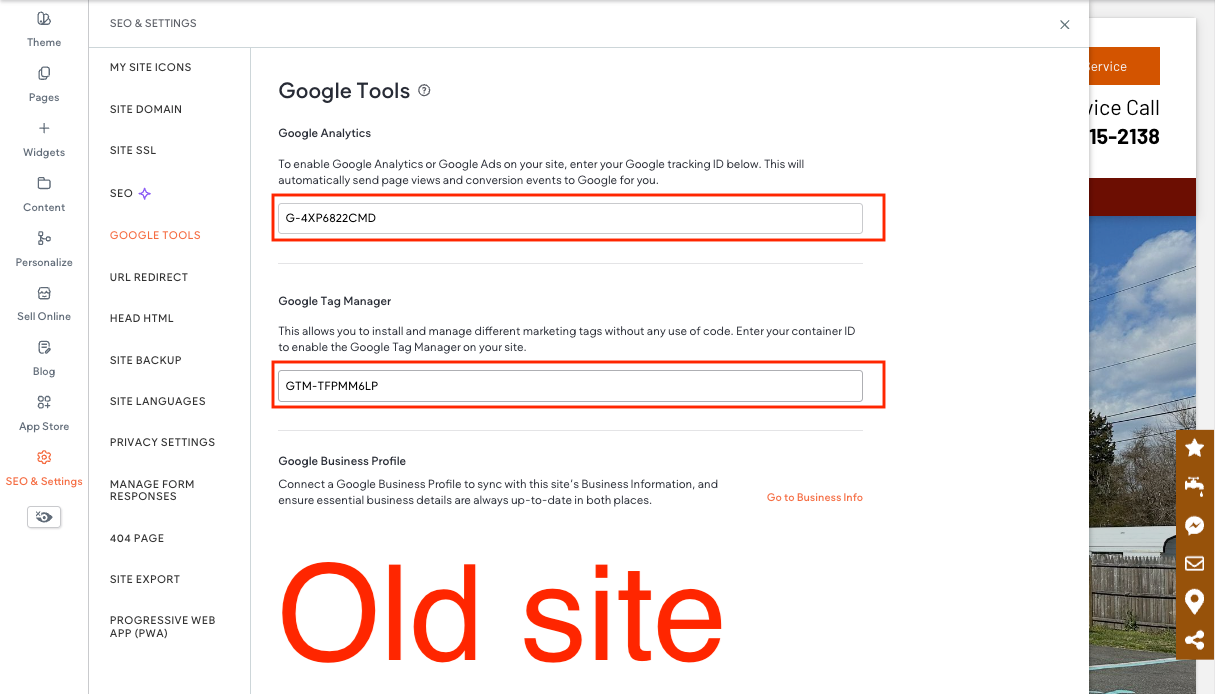
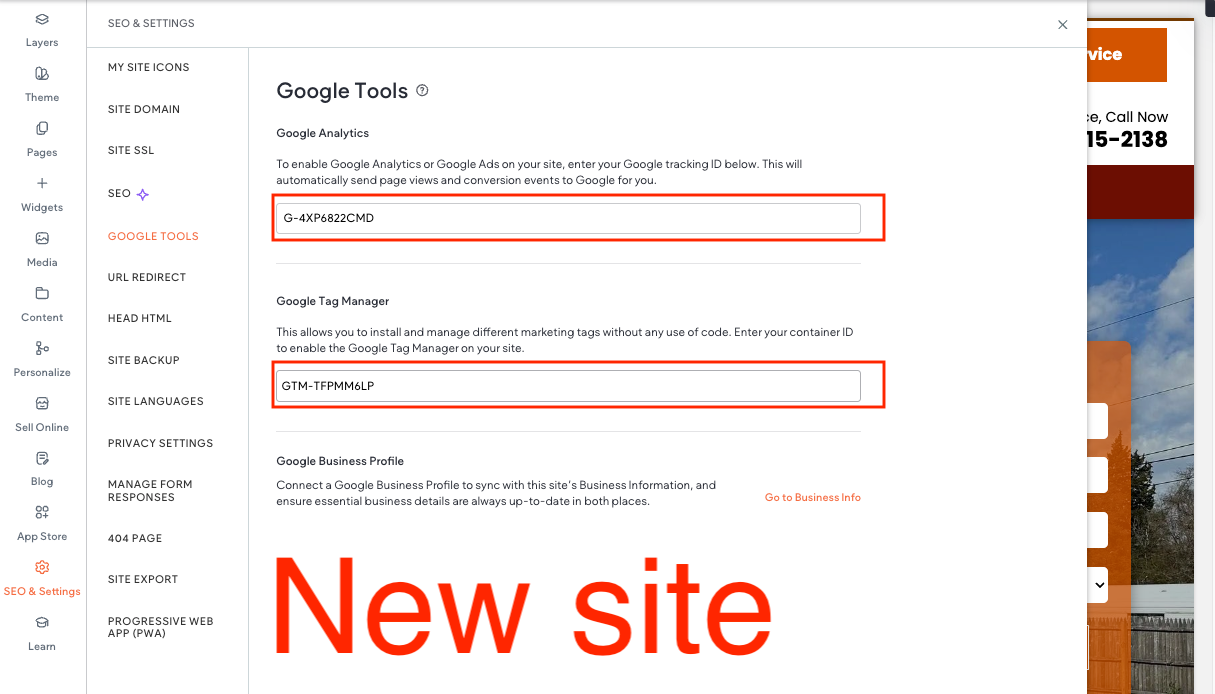
All Google tracking IDs and verification codes must be added in the Google Tools tab under SEO & Settings.
Rules for placement:
- All tracking IDs must be entered into the Google Tools fields.
- Verification codes (for example, Search Console) must be entered as verification values only.
- Never paste full script tags or meta tags into the site code or HTML areas.
- Google Tools fields must always be used instead of custom code injection.
Transfer From Previous Hibu Sites
If a client’s previous Hibu website included Google tracking, those same tracking IDs must be transferred to the new Hibu One website to maintain reporting continuity.
Rules:
- Existing Google Analytics IDs or Google Tag Manager container IDs must be reused.
- All transferred IDs must be entered into the Google Tools fields in Duda.
- Tracking continuity depends on using the same client-owned Google accounts.
Supported Tracking Codes
Hibu supports client-supplied IDs for the following Google services:
- Google Analytics
- Global Measurement ID (G-) or UA Property ID (UA-)
- Google Ads\
- Conversion ID (AW-)
- Floodlight / DoubleClick
- Tracking ID (DC-)
- Google Tag Manager
- Container ID (GTM-)
- Google Search Console
- Verification code (client-supplied)
Only supported ID formats may be added.
Rules & Limitations
- Clients must provide their own Google tracking IDs.
- Hibu does not create or manage Google Analytics, Google Tag Manager, Google Ads, or Search Console accounts.
- Clients retain full ownership, access, and control of all Google data.
- Google supports multiple tracking IDs on a single site; client tracking and Hibu internal tracking can run together without conflict.
- Tracking functions only on published, live sites and will not work on previews.
- If tracking appears inactive, common reasons include:
- The site is not yet published
- Ad blockers preventing data collection
- New setups that have not fully activated (up to 24 hours)
Internal Note (Transparency)
For internal performance monitoring, Hibu includes its own Google Analytics tracking on every site.
- This data is aggregated across Hibu websites.
- Client data is not shared or exposed through this tracking.
- Hibu’s internal tracking does not interfere with client-supplied Google tracking.
Supported Tracking Codes
Hibu supports client-supplied IDs for the following Google services:
- Google Analytics – Global Measurement ID (G-) or UA Property ID (UA-)
- Google Ads – Conversion ID (AW-*)
- Floodlight / DoubleClick – Tracking ID (DC-*)
- Google Tag Manager (GTM-*) – ID for managing tags
- Google Search Console – Verification meta tag (client supplies code)
Rules and Limitations
- Hibu will not create or manage Google accounts (Analytics, Ads, Tag Manager, or Search Console). Clients must provide their own IDs.
- Google supports multiple tracking codes per site, so client IDs and Hibu’s internal tag can run together without conflict.
- Tracking codes only function on published/live sites — they will not work on proofs.
- If tracking appears broken, common causes include:
- Site not yet published
- Ad blockers preventing data collection
- Setup within the past 24 hours (may not be active yet)
Internal Note (Transparency)
For internal testing and performance monitoring, Hibu includes its own Google Analytics tracking ID on every site.
- This ID is aggregated across all Hibu websites.
- Data from Hibu’s internal tag is not shared with clients.
- This setup does not interfere with client-supplied IDs.