Auto-responder Emails
Auto-responder Emails
Effective Date: February 1, 2026
Last Updated: February 1, 2026
Hibu Policy
Hibu supports an optional form auto-responder that sends an automated email confirmation to the person who submits a form on a Hibu One website. Auto-responders can only be enabled when explicitly requested by the client and when all required client-provided information is supplied.
Auto-responders are configured at the individual form level. When a client requests an auto-responder, Hibu must manually apply the same approved configuration to each eligible form. Auto-responders are not global and do not automatically apply across all forms.
Auto-responder Emails: At-a-Glance
| Item | Rule |
|---|---|
| Client request required | Yes — auto-responders are never enabled by default |
| Configuration level | Per individual form (not global) |
| Eligible forms | Request forms, Contact Us form, and approved custom forms |
| Hero forms | Not supported |
| Required client inputs | Email subject line and email message content |
| Sender name (displayed) | Business name by default; can be updated upon client request |
| Sender email address | no-reply@websites.hibu.com (cannot be changed) |
| Submitter form response | Must be manually enabled and is required |
| Thank You page update | Required when auto-responder is enabled |
| Thank You page indexing | Must remain no-indexed |
Definition
A form auto-responder is an automated email sent to a form submitter immediately after a successful form submission. The email confirms receipt of the inquiry and displays a custom client-approved message followed by a copy of the submitter’s completed form information.
Rules & Guidelines
Client Request Requirement
- Auto-responders are not enabled by default.
- Auto-responders can only be added if the client explicitly requests them.
- Auto-responders are configured per form and must be manually added to each eligible form.
Eligible Forms
Hibu will only add auto-responders to the following form types:
- Request forms embedded on request-based pages (for example, Request a Quote or Request an Estimate)
- The Contact Us form found on the Contact page (also referred to as the Send a Message form)
- Custom forms requested by the client (for example, Submit Your Resume forms)
Auto-responders are not added to hero forms.
Required Client Inputs
Before an auto-responder can be enabled, the client must provide:
- The email subject line
- The full email message content
If either item is missing, the auto-responder cannot be added.
Client-Facing Script (Reference)
Before enabling an auto-responder, teams should clearly communicate the following to the client. This script may be copied into site comments, sent via email, or read aloud during a call:
Yes, we can add an auto-responder to your website forms. Before we can do so, we’ll need you to provide the email subject line and the exact message you want the email to contain. This message will appear above a copy of the customer’s submitted form information. The email is sent from a no-reply address, and replies are not monitored.
Below is an example of the type of message you might choose to include. You’re welcome to use this as-is or provide your own wording.
‘Thank you for reaching out to [Business Name]. We’ve received your request and will be in touch shortly to discuss next steps. If you need immediate assistance, please feel free to call us at [Phone Number].’
From Name
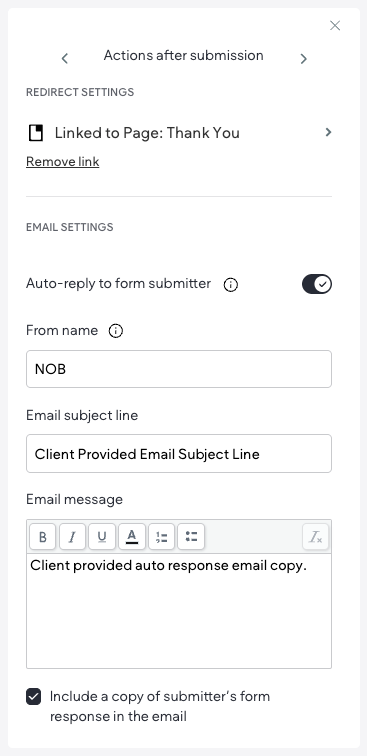
- The visible "From name" in the recipient’s inbox initially uses the client’s business name.
- This value must be manually entered during setup; it is not applied automatically.
- If the client later requests a change to the sender name, Hibu may update it upon request.
- Hibu does not proactively suggest alternative sender names.
Sender Email Address
- Auto-responder emails are sent from no-reply@websites.hibu.com.
- This sender email address cannot be changed.
- Replies to these emails are not monitored.
Platform Behavior (Duda)
- By default, Duda sends an auto-reply to the form submitter when a valid email address is provided.
- Hibu controls whether the auto-reply is enabled or disabled using the Auto-reply to form submitter toggle.
Email Subject Line
- The subject line must be provided verbatim by the client.
- Hibu does not create, edit, or optimize subject lines.
Email Message Content
- The email message body must be provided verbatim by the client.
- The custom message always appears above the submitter’s form response.
- Hibu does not edit, rewrite, or optimize client-provided message content.
Submitter Form Response Copy
- A copy of the submitter’s completed form fields must be included in the auto-responder.
- The option to include the submitter’s form response is not enabled by default.
- Teams are required to manually select the option to include the form response during setup.
- The form response section cannot be edited, reordered, or removed.
Thank You Page Requirements
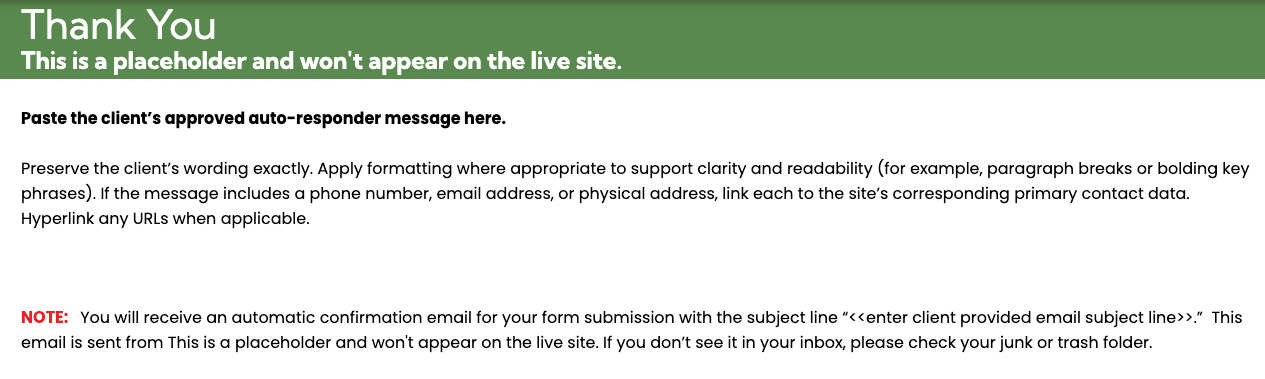
When an auto-responder is enabled, Hibu must update the site’s system Thank You page.
- Every Hibu One site includes a system Thank You page that is hidden from navigation.
- The Thank You page must remain no-indexed. Indexing is disabled by default and must not be enabled.
- The placeholder content on the Thank You page must be replaced with the client-provided auto-responder message.
Required Thank You Page Note
The Thank You page template (located in the Xtra Page folder) includes a standard confirmation note placed below the client’s message. This note is part of the Thank You page structure and must remain in place.
The note communicates that:
- The visitor will receive an automatic confirmation email for their form submission
- The email subject line (entered by the team)
- The business name shown as the sender (entered by the team)
- Guidance to check junk or trash folders if the email is not visible
The template includes placeholders for the business name and email subject line, which must be populated during setup.
- This confirmation note appears on the Thank You page only and must not be included in the auto-responder email itself.