
Alt Text Tags
Alt-Text
Effective Date: February 1, 2026
Last Updated: February 1, 2026
Definition
Alt text (alternative text) tags are used within an HTML code to describe the appearance and function of an image on a page.
Purpose / Why It Matters
- Adding alt text tags to images* is first and foremost a principle of web accessibility. Visually impaired users rely on screen readers—assistive software that reads on-screen content aloud—to understand images through their alt text tag.
- Alt text tags will be displayed in place of an image if an image file cannot be loaded.
- Alt text tags provides better image context / descriptions to search engine crawlers, helping them to index an image properly.
*Any png, jpg, jpeg, gif, svg, webp uploaded is defined as an image.
*The alt text tag is not required for background images, since these images are not read by screen readers.
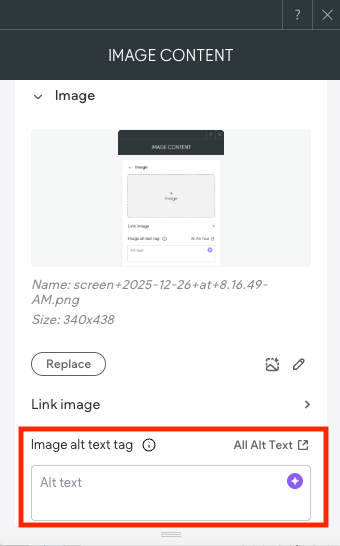
Optimal Alt Text Tags Formatting
The best format for alt text tag is sufficiently descriptive but doesn't contain any spammy attempts at keyword stuffing. If you can close your eyes, have someone read the alt text to you, and imagine a reasonably accurate version of the image, you're on the right track.

Not-so-good alt tag = dog
This alt text can be better because it's not very descriptive. Yes, this is an image of a dog, but there's more to be said about this image.

Not-so-good alt tag = dog running
This alt text is better. Yes, it is an image of a dog running, but there's still more to be said about this image.

Ideal alt tag = Border Collie running on beach
This alt text is the ideal alternative because it is far more descriptive of what's in the image. This isn't just a dog or a dog running; it's a Border Collie running on a beach.

Not-so-good alt tag = hammer and nail
Not-so-good alt tag = hammer nail into a roof
Ideal alt tag = hammer nail into a roof shingle
Alt Text Tags Tips
- Describe the image as specifically as possible. Alt text is, first and foremost, designed to provide text explanations of images for users who are unable to see them.
- Keep it (relatively) short. The most popular screen readers cut off alt text at around 125 characters, so it's advisable to keep it to that character count or less.
- Use your keywords. Alt text provides another opportunity to include targeted keywords on a page, and thus another opportunity to signal to search engines that the page is highly relevant to a particular search query. While the first priority should be describing and providing context to the image, if it makes sense to do so, include a keyword and/or name of business in the alt text of at least one image on the page.
- Avoid keyword stuffing. Google won't "dock points" for poorly written alt text, but there could be consequences if the alt text is stuffed with too many or irrelevant keywords. Again, focus on writing descriptive alt text that provides context to the image and, if possible, includes a targeted keyword, and leave it at that.
- Don't include "image of," "picture of," etc. in alt text. It's already assumed your alt text is referring to an image, so there's no need to reiterate it.
When to Use an Alt Tex Tag
| Image Type | Alt Text (Y/N) | |
|---|---|---|
| Client Logo | Yes | |
| Call Out / In-Line Images | Yes | |
| Slider | Yes | |
| Gallery Images | Yes | |
| Row / Container Background Images | No | |
| Button | No | |
| Badges | Yes | |
| Shields | Yes | |
| Icons | No | |
| Social Icons | Yes | When manually added |
| Pay Icons | Yes | When manually added |
Examples
Client Logos
- Enter NOB logo as alt tag for the Hibu client logo. The client logo is the only instance when you add "logo" to the alt text.

alt text tag = OnTrack Accounting logo

alt text tag = Nittoli's Pizzeria logo

alt text tag = Dali Painting logo
Badges / accreditation logos (usually associated with a row directly above the footer or on contact us page)
- Transcribe all readable text on the image.

alt text tag = The National Trial Lawyers Top 100 Trail Lawyers
alt text tag = EcoTherm Insulation

alt text tag = Best of the Best Dentists
Icons (SVG, png, and, on occasion, jpg, gif, webp)
- Do not add alt text for decorative icons, such as those used in the hero, “Why Choose Us,” reviews, footer, engagement sections, or callouts. Adding alt text to purely decorative icons introduces unnecessary noise for screen readers and does not improve SEO or accessibility.