
Reviews Widgets: Display Rules, Sources, and Placement Standards
Reviews Widgets: Display Rules, Sources, and Placement Standards
Effective Date: February 1, 2026
Last Updated: February 25, 2026
Hibu Policy
Hibu One supports a standardized Reviews widget is a standardized Hibu One component that displays customer ratings and review content sourced from:
- Hibu Reviews
- Google Reviews
- Facebook Reviews
Reviews (star rating and review count) will display in the header, homepage, category landing pages, and right gutter
only when a client has:
- Three (3) or more total reviews, and
- An overall rating of 4.0 or higher
- If either threshold is not met, review stars and counts will not display in those areas.
- The dedicated Reviews page will display all eligible reviews regardless of star rating or review volume.
- Only the Hibu Reviews widget is supported in the header. Third-party review widgets are not permitted in the header area.
If the client requests removal of any version of the Reviews widget, Hibu may remove the widget with the understanding that doing so may negatively impact conversion.
Purpose / Why It Matters
- Reviews are a core trust signal. Placement in high-visibility areas—especially the header—directly supports credibility and conversion.
- Internal research and performance data show measurable conversion lift when reviews are displayed prominently in the header.
- The Hibu Reviews widget is performance-optimized and structured to maintain schema integrity, speed, and consistency across devices.
- Removing reviews may reduce trust signals and conversion performance. Teams must clearly communicate this risk when requests are made.


Reviews Widget Placements
1. Header (Desktop, Tablet, Mobile)
- Displays overall star rating and total review count.
- Visible only when the 3-review minimum and 4.0+ rating threshold are met.
- Only the Hibu Reviews widget is permitted in this area.
- Third-party widgets are not allowed in the header.
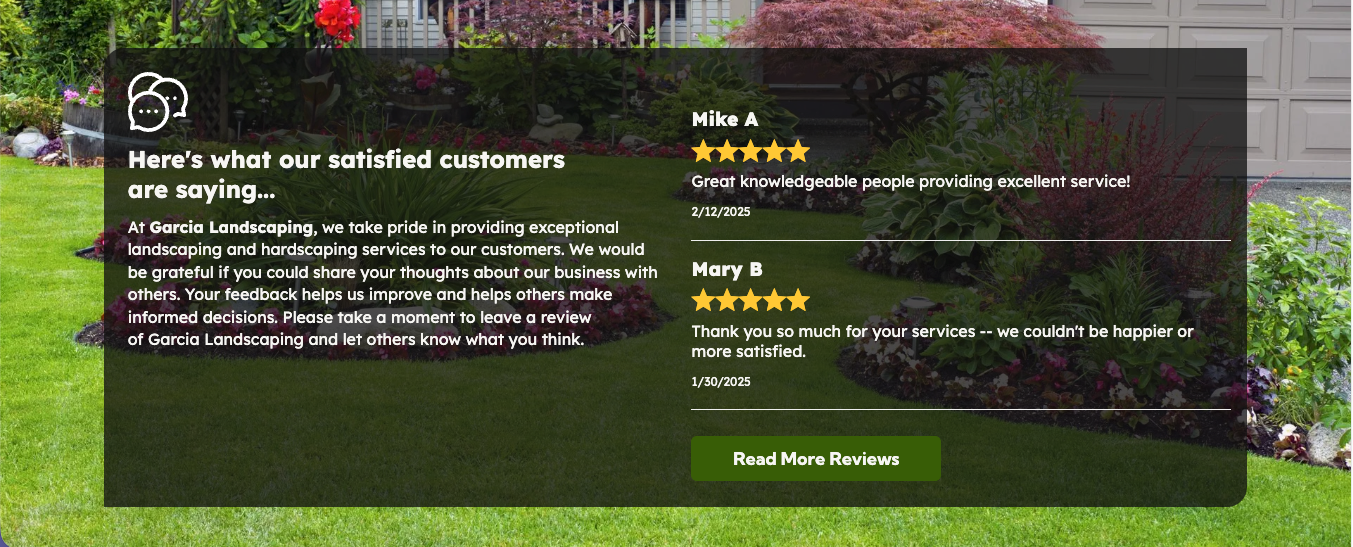
2. Homepage & Category Landing Pages (“Recent Reviews”)
- Displays the two most recent reviews.
- Requires 3+ total reviews and 4.0+ overall rating.
- If thresholds are not met, reviews do not display.
- If the client requests removal, the widget may be removed.
3. Right Gutter (Core Service/Product Pages)
- Displays shuffled reviews from varying time periods.
- Refreshes dynamically across page loads.
- Requires 3+ total reviews and 4.0+ overall rating.
- May be removed upon client request.
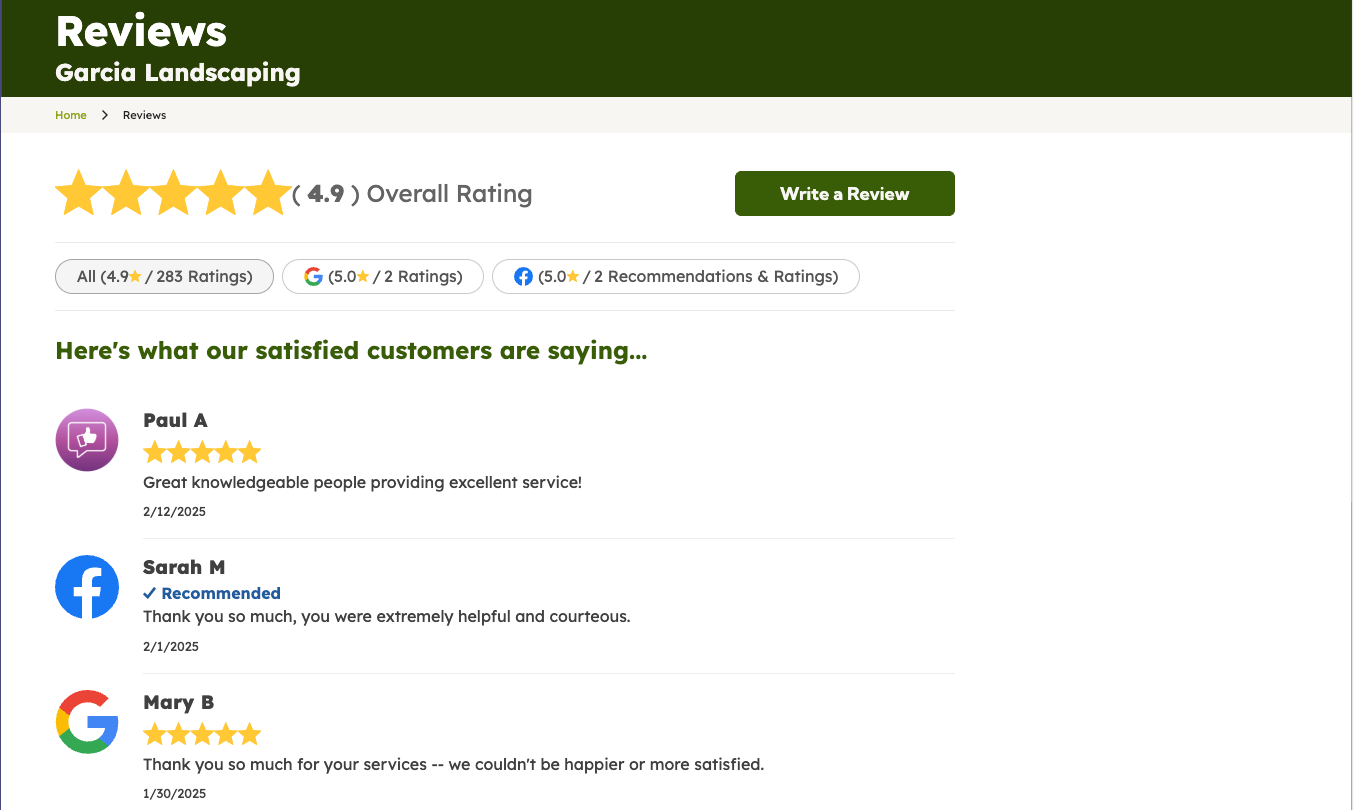
4. Dedicated Reviews Page
- Displays all review sources in chronological order.
- No minimum review count requirement.
- No rating threshold requirement.
- If one review exists, one review displays.
- If the overall rating is below 4.0, it still displays here.
- This page reflects the full review dataset without front-end threshold restrictions.
Review Source & Inclusion Rules
Included Sources
- Hibu Reviews
- Google Reviews
- Facebook Reviews
On the Reviews page:
- Reviews appear in chronological order.
- Hibu reviews are marked with a purple Hibu icon.
- Google reviews display a Google icon.
- Facebook reviews display a Facebook icon.
Negative Review Handling
- Negative Hibu reviews are not displayed.
- Negative Google and Facebook reviews may appear.
- All Google and Facebook reviews (positive and negative) count toward the total review count and overall rating.
Third-Party Review Widget Policy
Hibu Policy
- Only the Hibu Reviews widget is supported in the site header.
- Third-party review widgets (including Google, Facebook, or other externally embedded platforms) are not permitted in the header under any circumstance.
Rationale
Third-party review widgets:
- Load dynamic external scripts
- Can negatively impact page speed, especially on mobile
- May interfere with structured data and schema
- Introduce visual inconsistency across devices
The Hibu Reviews widget is performance-optimized and aligned with Hibu One standards.
Allowed Placement
Third-party review widgets may appear on the dedicated Reviews page only.
They are not supported in:
- Header
- Homepage recent reviews
- Category landing page recent reviews
- Right gutter widgets
Review Star Color Standards
Default Standard
Yellow or gold remains the default and recommended star color. It is the industry standard and provides strong visibility and recognition.
Approved Alternative Colors
When deviating from yellow or gold, the star color may be:
- Blue (or variation of blue)
- Green (or variation of green)
- Purple (or variation of purple)
- Orange (or variation of orange)
These colors are permitted only if:
- The exact shade used exists within the client’s established color palette.
- The same shade is used consistently across the entire site.
- The color maintains sufficient contrast against the background.
Do not introduce a new variation of a color if a different shade of that color already exists in the brand palette.
Black and White Usage
- White stars may be used only on dark backgrounds.
- Black stars may be used only on light backgrounds.
- Contrast and accessibility standards must be maintained.
Restricted Colors
The following are not permitted:
- Red
- Pink
- Maroon
- Burgundy
- Any variation of red or pink tones
- Pale or low-contrast colors
- Colors that closely match the background
Implementation Requirement
- When changing the review star color, the update must be made in the site’s Theme Colors using the designated placeholder for review stars (Color #14).
- All review placements (header, homepage, category pages, right gutter, and Reviews page) must reflect the same color.
- It is expected that the Hibu design team will rename any updated image or asset files and apply appropriate alt text where applicable.